When SharePoint email notifications stop arriving, the cause is almost always one of seven things: the native alerts feature being retired by Microsoft, nobody actually subscribed, spam filtering, a departed alert owner, conditions that never match, an empty recipient column, or delivery failing silently with nothing to check. This guide walks each cause with its fix, in the order worth checking them, and then addresses the structural problem underneath most of them: native notifications fail invisibly, which is why the durable fix is a notification engine that logs every send, the full replacement for SharePoint alerts.
First, know which system you are debugging
SharePoint notifications come from different machinery depending on how they were set up, and the diagnosis differs by machinery. Native alerts are the classic per-user subscriptions ("Alert me") on lists and libraries. Workflow and flow emails come from whatever automation someone built. And Ultimate Forms alerts are configured notification rules with their own engine and delivery log. The first diagnostic question is always which of these was supposed to send the missing email, because each fails differently, and the sections below are organized accordingly: causes one to four afflict native alerts, five and six afflict configured rules of any kind, and seven afflicts everything that lacks a log.
Cause 1: native SharePoint alerts are being retired
The hardest version of "notifications stopped working" is the one where nothing is misconfigured: Microsoft has been retiring the classic alerts feature in SharePoint Online, and notifications that ran for years stop because the platform beneath them is being withdrawn, the retirement and its timeline are covered in detail separately. If your missing notifications are native alerts in SharePoint Online, check that article first, because no amount of troubleshooting revives a feature that is going away. The fix is migration, not repair: recreate the notifications as configured alert rules, which takes minutes per alert with the setup guide and upgrades them in the process.
Cause 2: nobody is actually subscribed
Native alerts are per-person subscriptions, and the model fails organizationally even where it works technically. The person who should be notified never clicked Alert Me. The person who did click left the team, and their subscription left with them. A new team member assumes notifications "just happen" because they did for their predecessor. Check the list's alert subscriptions (list settings show them per user) and you will often find the mystery solved: the email is not arriving because no rule says it should.
The fix that lasts is taking notification out of individual hands: a configured alert with recipients resolved from the item's columns, the Assigned To, the Manager, notifies the right person for every item regardless of who subscribed to anything, and survives every staffing change.
Cause 3: the email arrived, somewhere
Delivery is not the same as visibility. Automated notifications are precisely the mail that junk filters, clutter folders, and inbox rules eat, and the probability rises when messages come from unfamiliar service addresses with generic subjects. Have the recipient check junk and any sweep rules, and ask the mail administrator whether the sending address needs allow-listing, the deliverability guide covers the mail-side hygiene in depth.
Then reduce the filter bait: notifications with specific, human subjects ("Purchase request 2041 approved, $4,820") and real content survive filters and attention better than "An item has been modified," which is the message-craft argument wearing its deliverability hat.
Cause 4: the notification depended on a person who left
Workflow emails and personal subscriptions share a failure mode: ownership. The flow runs under a departed user's connection and died with their account; the subscription belonged to someone gone; the one person who understood the notification logic is unreachable. If the missing email traces to machinery owned by an individual, the repair is also the lesson: rebuild it as configuration on the list itself, owned by the process, where the alert rules are visible to any administrator and belong to no one's account.
Cause 5: the conditions never match
For configured alerts that have never fired, the commonest cause is conditions that cannot pass. The classic cases: a condition on the wrong value ("Approved" versus the column's actual "Approved by manager"), an after-change condition where a plain condition was meant (the alert waits for a transition that already happened), or the reverse, a plain condition where after-change was meant, so the alert fired once long ago and the team concluded it was broken when it politely declined to repeat itself. Walk the condition against a real item's actual values, letter for letter, and test by making the exact change the condition describes.
Cause 6: the recipient resolved to nothing
Column-resolved recipients are the right pattern, with one failure mode: the column is empty on the item that changed. The Assigned To was never set, the Email column is blank on an old record, the Manager lookup broke when the user list changed. The alert fired, found no one, and had no one to complain to. Check the triggering item's recipient column first whenever a normally reliable alert misses one specific item, and close the hole at the source: make the column required or validated where the process depends on it.
Cause 7: nothing failed, you just cannot see it
The deepest problem is structural. Native alerts and most workflow emails fail silently: no delivery record, no error surface, no way to distinguish "never sent" from "sent and filtered" from "sent to the wrong address." Every diagnosis above gets harder when the first question, did the system even send it?, cannot be answered, and notification trust erodes on exactly that uncertainty.
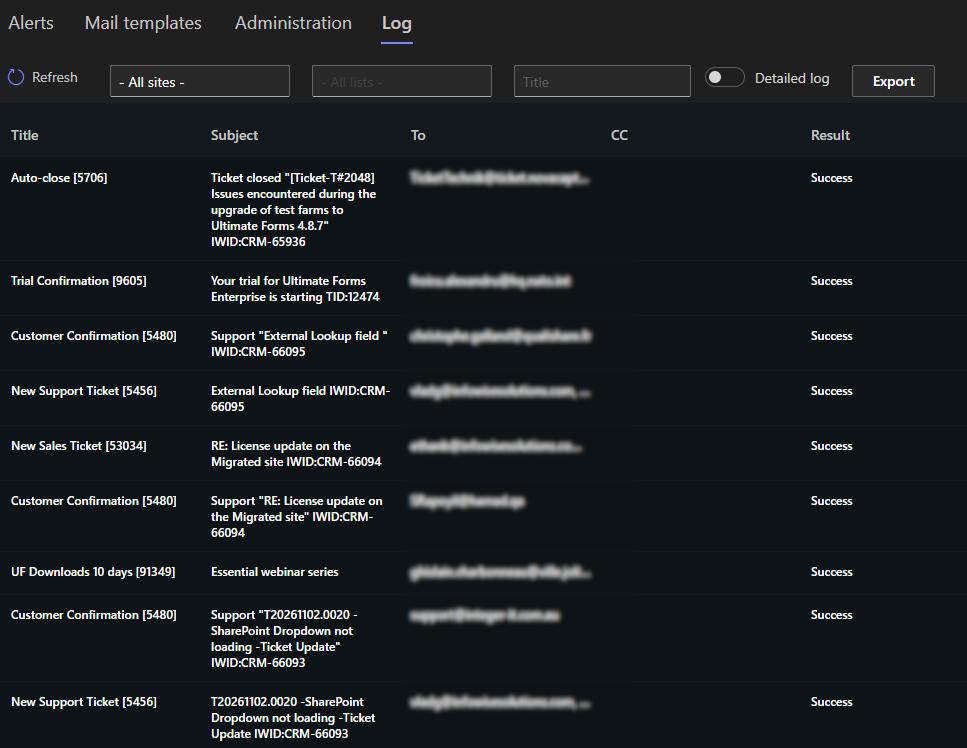
This is the argument for logged delivery as a requirement rather than a luxury. In the Ultimate Forms engine, every send is recorded with its time, recipients, and content, so troubleshooting inverts: the log says sent at 14:32 to these addresses, and the investigation moves confidently to the mail side, or the log shows no entry, and the investigation moves to conditions and triggers, cause five and six, with half the possibilities eliminated in one lookup. The debugging checklist for a quiet configured alert is short and ordered: log entry present? If yes, mail side. If no, walk the conditions, then the trigger events, then the recipient column.
The durable fix
Each cause has its patch, but six of the seven share a root: notification arrangements that depend on individual subscriptions, individual owners, and unverifiable delivery. The durable fix is moving notifications onto configured, logged rules owned by the process, recipients from columns, conditions on transitions, custom messages that survive filters, and a delivery log that ends every "did it send?" debate, with digests, schedules, and Teams delivery available where email singles are the wrong shape. Migrating a list's notifications takes about five minutes per alert with the setup guide, and the next time someone says the notification did not arrive, the answer starts from a log entry instead of a shrug.
Frequently asked questions
Add your comment