Most approval workflows are one of ten patterns wearing different column names. Each pattern below is real, named for what it does, illustrated with the process it usually runs, and sketched as its Ultimate Forms configuration, almost always the Approval control plus a condition or two. Find the shape of your process in the list, borrow its recipe, and skip the blank-page stage entirely. For the concepts underneath the recipes, the complete guide to SharePoint approval workflows is the companion piece.
1. The manager sign-off
Runs: leave requests, timesheets, small expenses, work-from-home requests. The simplest pattern and the most common: one approver, resolved dynamically from the requester's profile, so every submission finds its own manager with nothing configured per person. One Approval control, one dynamically resolved approver, automatic start on creation. The whole build is minutes, and the pattern's only real decision is the reminder schedule, because the manager sign-off stalls on forgetfulness, never on complexity.
2. The levels by amount
Runs: budget requests, purchases, capital expenditure. Approvers join the chain as the number grows: manager always, department head above $10,000, CFO above $50,000. Configured as a sequential approver list with conditions on the later levels; each request assembles its own chain, and small requests never wait on large-request ceremony. The full build, including the level-design thinking, is in the multi level approval workflow guide.
3. The specialist gate
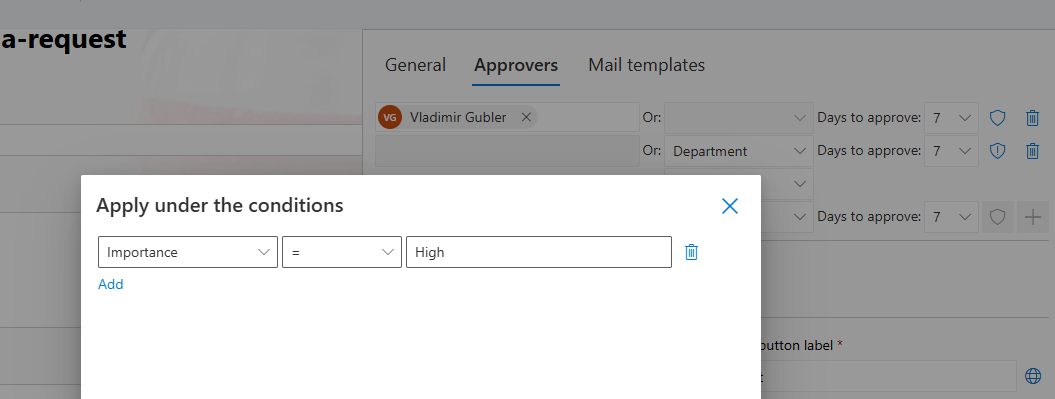
Runs: contracts, data processing agreements, anything with a reviewing profession. A specialist, legal, security, compliance, joins only when the item's type demands it: Contract Type is Vendor Agreement brings in legal; routine renewals skip the queue. The condition is on type rather than amount, and the payoff is the specialist's queue shrinking to the items that genuinely need them. The contract approval workflow is this pattern end to end, signatures and renewals included.
4. The round table
Runs: policy changes, cross-department standards, shared budget decisions. Several reviewers, all of whom must agree, none of whom depends on another's answer: a parallel stage in the Approval control, where every member receives the task at once and the stage completes when all have approved. The discipline is scoping: parallel approval is for genuine co-authority, not for keeping people informed, which is what alerts are for. Use it where a false sequence would just add latency to consensus.
5. The first responder
Runs: helpdesk escalations, access grants, anything a team owns collectively. A group approves, and any one member's decision completes the stage: first-to-respond mode on a SharePoint group approver. Throughput is the point, the request proceeds at the speed of the fastest available person, and absence insurance comes built in, because no single calendar can stall the queue. Pair with a norm about who picks up what, or the keenest teammate approves everything.
6. The rubber stamp retired
Runs: small expenses, standard access requests, routine renewals. When the criteria are objective, the approval is a formality, so stop performing it: an action auto-approves items meeting the rules, under $100 with a receipt attached, say, and only the exceptions route to a human. The approvers' queue shrinks to the judgment calls, and a daily tracking list counts both streams so the auto-approval rate stays visible. Most decisions in a high-volume queue are not decisions; this pattern admits it.
7. The two-person rule
Runs: quality release, financial controls, anything regulators read. One person does, another verifies, and the record proves both: a sequential pair of approvers, the doer barred from being the checker, with electronic signatures binding each decision to the values it covered. Form locking between the signatures keeps the record stable, and any later change breaks the signature visibly. This is the pattern where the approval is the control, so build it with the tamper-evidence the audit will ask about.

8. The outside voice
Runs: client quote acceptance, vendor confirmations, counterparty sign-offs. The approver has no account in your tenant. An external form link carries them to the one record needing their decision, an edit form scoped to exactly that, and their response lands in the same list that drives everything else. For contracts, the DocuSign integration handles the legally managed version. The pattern's rule: never let the outside step leave the system, or the audit trail develops a gap exactly where disputes happen.
9. The pocket approval
Runs: operational go-aheads, shift swaps, urgent releases, anything with a deskless decider. The approver is on a floor, a road, or a site. Deliver the decision to where they are: Teams messages with action buttons, where approve is one click in a chat with an automatic mention, or a full SMS approval loop, where a Yes reply from a phone sets the status. The trade is richness for speed, so reserve the pattern for binary decisions and let anything needing context fall back to the form.
10. The controlled release
Runs: SOPs, published policies, engineering documents. The item is a file whose stability matters as much as the decision: submission checks the document in, approval locks it and moves it to the published library, rejection checks it back out for revision, and every state change is an action on the document's own events. The approvals with check-in and check-out build covers the full choreography. The pattern's promise is the sentence auditors want: what was approved is what exists.
What all ten share
Underneath the variety, every pattern above rests on the same four guarantees, and they come from the Approval control rather than from the pattern. The decision is taken in the form, with the item's data in front of the decider. The record is locked while the decision is pending, so what was approved is what stands. Every decision, comment, and delegation lands in the approval log, timestamped and attributed. And silence has a consequence, reminders first, escalation after, so no pattern ever depends on someone remembering.
That shared floor is why switching patterns later is cheap: the guarantees persist while the routing changes, and a process that outgrows the manager sign-off becomes levels by amount by editing an approver list, not by rebuilding a workflow.
Choosing, combining, and starting
Two observations make the list practical. First, the patterns compose: a real purchasing process might be levels by amount (2) with a specialist gate for new vendors (3), auto-approval under the floor (6), pocket delivery for the traveling CFO (9), and escalation watching every stage, which the escalation rules add to any of the ten. The Approval control expresses such combinations as one readable approver list, which is the reason composition stays maintainable.
Second, the pattern is a starting point, not a cage. Begin with the one that matches your process's center of gravity, run it for two weeks, and let the exceptions you meet tell you which second pattern to blend in. Most teams discover their process was simpler than the org chart implied, a two-pattern combination at most, and the complete guide to SharePoint approval workflows covers the machinery any of the ten will need: the routing, the reminders, the hard cases, and the audit underneath.
Frequently asked questions
Add your comment