An SLA is four promises: a deadline will be set, someone will be warned before it, something will happen when it breaks, and the results will be measurable. All four run as configuration in Ultimate Forms, a third-party platform inside SharePoint: value rules compute each item's deadline from its priority, date-based alerts remind the owner before the clock runs out, timer actions escalate the breaches, and views, KPIs, and scheduled reports keep the performance visible. This guide assembles the four promises into a working SLA system on an ordinary SharePoint list, with no workflow engine and no code.
Where SLAs actually fail
Few organizations lack SLA definitions; most lack SLA machinery. The targets live in a policy document, response in four hours for P1, resolution in three days for standard, and the enforcement lives in people's attention, which is exactly where it dissolves. The deadline is whatever the assignee remembers it to be. The warning is a colleague asking "wasn't that due yesterday?" The escalation is an annoyed email from the customer, arriving after the breach it should have prevented. And the measurement is a quarterly scramble through closed tickets, producing numbers nobody fully trusts.
The failure is structural, not personal: promises about time need machinery that watches time, and humans are the wrong machinery. The four promises below each get a mechanical implementation, and together they turn the policy document into system behavior. A help desk list is the running example, tickets with Priority, Status, and the dates, but the same assembly serves approvals, requests, incidents, and anything else with a clock on it.
Promise one: the deadline sets itself
An SLA deadline that someone types is already a breach waiting to happen, so the first move is computing it. A value rule on the ticket sets Due Date from the item's own facts at creation: [Created]+4 hours when Priority is P1, [Created]+3 days for standard, different arithmetic per category where the policy says so, the same date arithmetic that drives validations. Pair the rule with a permission rule locking the column, and the deadline is both automatic and tamper-resistant: visible to everyone, edited by no one, adjusted only by the rules when the policy's inputs change, a priority raised mid-ticket recomputing the clock.
Response and resolution can carry separate columns, First Response Due and Resolution Due, because mature SLAs time both, and the stamped actuals, First Responded, Resolved, set themselves the same way: value rules writing [Today] when the status makes its transition, guarded by after-change conditions so each stamp lands exactly once. With targets and actuals both on the item, every later promise has its data, and the data was captured by the transition itself, which is the only reporter that never forgets and never rounds in its own favor.
Promise two: the warning before the breach
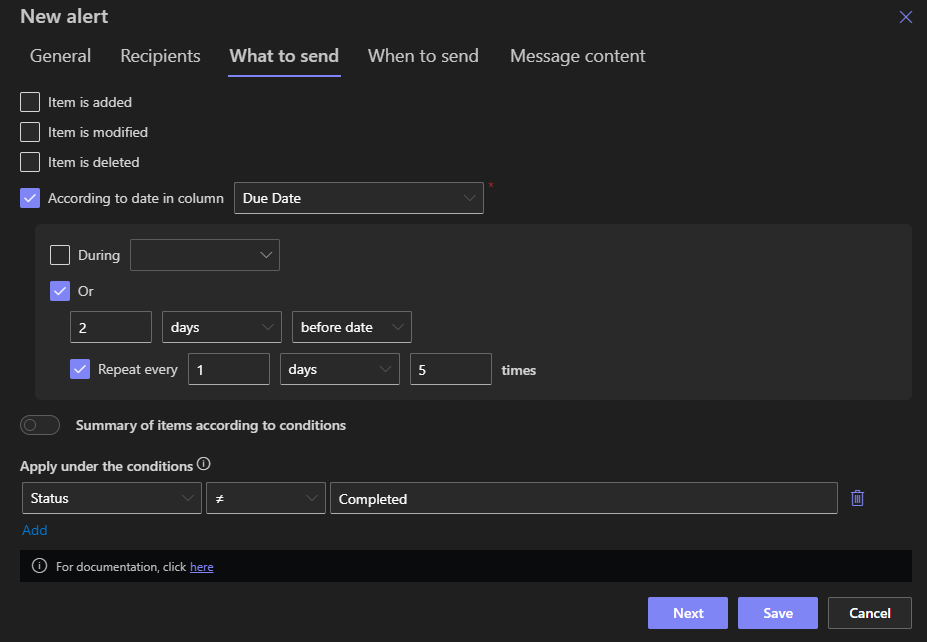
A reminder after the deadline is an apology; the system's job is the one before it. Date-based alerts key notifications to the deadline columns: the assignee nudged a day before Resolution Due, the P1 owner pinged an hour before First Response Due, each message naming the ticket, the remaining time, and the one link that opens it, written with the usual alert craft and delivered to Teams where that is where the team lives.
The visual layer warns continuously rather than at moments. Color-coded views paint the queue by time remaining, green, amber, red from a computed SLA-status column, and KPI indicators put the count of at-risk items on the team's dashboard, so the state of the clock is ambient, not archived in an inbox. The amber band deserves deliberate width: it is the zone where action is still cheap, and tuning it per priority, hours for P1, a day for standard, is most of the visual design. A queue someone glances at twice a day plus a reminder nobody can miss covers the two ways humans actually notice things.
Promise three: the breach escalates itself
When the deadline passes unanswered, the response must not depend on anyone noticing. A scheduled timer action sweeps the list, its static conditions selecting precisely the breaches, Due Date before [Today], Status still open, and executes per matching item: raise the Priority, stamp an Escalated flag, reassign to the team lead, and notify the manager with the item's facts in the subject line. Hourly for response SLAs, daily for resolution SLAs, and narrow conditions throughout, the sweep's economy matters, as the scheduling guide insists, and a flag column marking already-escalated items keeps each breach escalated once rather than on every pass.
Escalation tiers are more of the same: a second condition band, overdue by more than two days, triggers the next rung, the director's notification, the daily digest of chronic breaches. Where the clocked process is an approval, the machinery is already built in, the Approval control's reminders and escalation handle the approver who sits on a decision, and the escalation patterns article covers those builds in depth. And because every escalation is an action run, Action History records each one: when the breach was caught, what was done, who was told.
Promise four: the performance is measurable
With computed targets and stamped actuals on every item, measurement stops being archaeology. An SLA Met column, a value rule comparing Resolved against Resolution Due, makes every closed ticket self-scoring, and from there the reporting is ordinary platform work: views filtered to breaches, charts of met-versus-missed by team and priority, KPIs on the dashboard, and a scheduled report landing the month's SLA performance in the manager's inbox as a branded PDF, generated and sent by the same timer machinery that runs the escalations.
The measurement layer also closes the loop on the policy itself. When the numbers show P1 response targets missed every Monday morning, the finding is staffing, not discipline, and it is visible because the system recorded reality instead of recollection. SLA reporting that emerges as a byproduct of operation, rather than as a quarterly project, is the quiet difference between having targets and managing to them.
Assembling it, and keeping it honest
The build order follows the promises: the deadline columns and their value rules first (an afternoon), the reminders second, the escalation sweep third, the reporting last, and each layer works before the next exists, so the system earns trust incrementally. Two disciplines keep it honest over time. Keep the clock rules in one place conceptually, the deadline arithmetic, the stamps, the SLA-status computation, named and documented as the SLA machinery, so the next administrator finds one system rather than scattered cleverness. And resist the gamification failure mode: if closing and reopening a ticket resets its clock, the rules should say so deliberately, sequential status enforcement and after-change stamps make the clock cheat-resistant, which protects the assignees with good numbers as much as it exposes the workaround.
What the assembly never needed is worth noticing: no workflow engine, no SLA module license, no code. The four promises decomposed into columns, rules, alerts, timers, and reports, which is the platform's recurring lesson, most "capabilities" are compositions, and the composition is configuration.
Frequently asked questions
Add your comment