Actions can run on a schedule: every hour, daily, weekly, or monthly, at the time and day you choose. The one concept that makes scheduled actions behave predictably is the current item, because every action needs an item to run on, and a schedule, unlike a click or an event, does not point at one. There are two ways the current item gets chosen, and they produce two very different behaviors: once per matching item, or once per list. This guide explains both, when each is right, and the configuration details that keep scheduled automation efficient.
Actions and their triggers
Actions implement sophisticated business logic without the complexity of workflows. They change data in SharePoint and beyond: databases, SMS, Entra ID and Active Directory, and business applications. Configuration is approachable for non-technical users, nothing is deployed, and an action is ready to run the moment you click Save. With 19 action types, the coverage is broad.
Execution comes in three families. Actions respond to list events: items created, modified, or deleted. They run manually, from buttons on list views, the form toolbar, or inside the form. And they run on a timer.
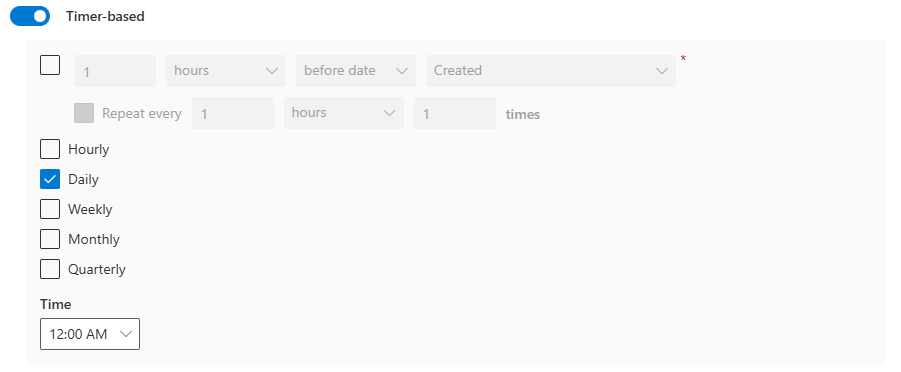
Timer-based actions themselves split in two. One flavor keys off a date column: run two days before the Due Date, with optional repetition. The other is pure recurrence: daily, weekly, or monthly at a specific time and day, plus hourly for fast-moving applications. The date-column flavor behaves intuitively. The recurring flavor is where the questions start, and where this article focuses.
The current item doctrine
Every action needs an item to run on. We call it the current item.
That does not mean the action must change that item. It might be talking to an external line-of-business application entirely. The current item plays two quieter roles: its column values serve as the input data available to the action, and the execution result is written into that item's action history. Without a current item, an action simply cannot execute.
Usually the choice is implicit and obvious. Event-driven actions run on the item that was added, modified, or deleted. Manual actions run on the item that was clicked. Date-column timer actions run on the item whose date matches, the one expiring in two days, say.
But a recurring action fires because the clock says so. Nine o'clock on Monday points at no item. So where does its current item come from? Two mechanisms, each with its own behavior, its own strengths, and its own costs.
Mechanism 1: static conditions, once per matching item
Any action accepts conditions; they ensure it runs only when needed. A condition selects a column, an operator, and a value: Status, equals, Completed. The value side can be static, like Completed, or reference the item's own columns, like Due Date greater than [End Date].
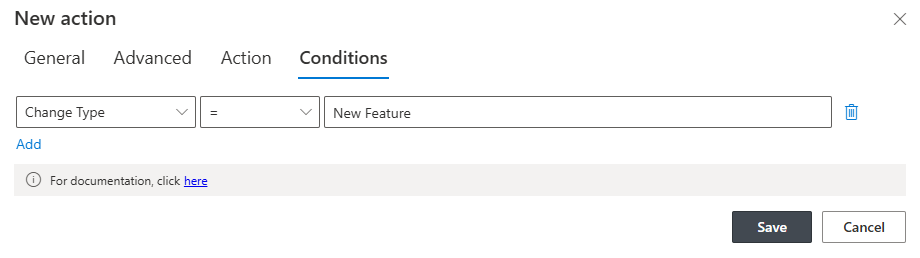
For a recurring action, static conditions do double duty. When the schedule fires, the action first uses them to query the list. Status equals Completed returns every completed item. Then the action walks the results item by item, executing itself on each, with that item as the current item. For each one, the full set of conditions is evaluated again, all of them this time, not just the static ones, and execution continues as usual.
The behavior, in one sentence: static conditions turn a recurring action into a per-item sweep over everything that qualifies.
This is exactly what chasing scenarios need. Every morning, find each item where the due date has passed and the status is still open, and escalate it: update it, notify about it, each item individually, each with its own history entry. Escalation patterns are this mechanism wearing a business name.
One warning deserves bold type: configure the conditions carefully and as narrowly as possible. The query runs every time the schedule fires. A loose condition sweeping thousands of items wastes server resources on every run, and heavy enough traffic can get your tenant throttled by Microsoft. Narrow conditions are not a nicety. They are the difference between a sweep and a stampede.
Mechanism 2: implicit selection, once per list
When a recurring action has no static conditions at all, the selection is simpler: the first item in the list becomes the current item, and the action executes once, based on its properties.
At first glance that sounds arbitrary. In practice it is the right default for the majority of scheduled work, because most scheduled work does not care about any particular item. It cares about the list as a whole.
The weekly open-tasks report is the canonical example. Leave the Conditions tab empty, so the action runs exactly once. Then, in the Items section of the action's settings, define what the processing should collect: Status equals Open. The action fires once, gathers every open task, and produces one report. One run, one output, no sweep.
Notice the division of labor between the two places conditions can live. The Conditions tab decides how many times the action runs. The Items section decides what the action's work includes. Confusing the two is the single most common scheduled-action mistake, and keeping them straight is most of the mastery.
Two builds, side by side
Seeing the mechanisms as configurations makes the contrast concrete.
The morning escalation sweep. Schedule: daily, 7:00. Conditions tab: Due Date less than [Today], Status not equal to Completed. Action: update the item's Priority, then send an email naming the item and its owner. At 7:00 the query finds, say, six overdue items. The action runs six times, once per item, and six history entries land on six records. Tomorrow it might run twice, or not at all. The schedule is fixed; the workload breathes with the data.
The Friday summary. Schedule: weekly, Friday 16:00. Conditions tab: empty. Items section: Status equals Open. Action: generate one report covering everything collected and send it to the team lead. One run, one document, every week, regardless of whether there are four open tasks or forty.
Same scheduling engine, same action machinery, opposite shapes. The first exists for the items. The second exists for the audience. Ask which one your scenario is, and the configuration writes itself.
Choosing, and choosing cheaply
The decision compresses to one question: does each qualifying item need its own execution?
If yes, the overdue reminder, the per-record sync, the individual escalation, use static conditions, kept narrow, and accept the per-item cost because per-item is the point. If no, the digest, the summary report, the batch export, the aggregate update, leave the Conditions tab blank and shape the work in the Items section. Once per list is the most efficient option, and in the majority of cases it is also the correct one.
Frequency deserves the same economy. Hourly exists for genuinely fast-changing applications; most business processes are well served by daily, and housekeeping by weekly or monthly. Schedule at quiet hours where the timing allows, and remember that every recurring action is a permanent tenant on your farm's clock. A quarterly glance at the list of scheduled actions, asking "does this still earn its slot?", keeps the clock honest.
Two neighbors complete the picture. When the scheduled work itself must repeat over a range, dates or numbers, loops inside action groups handle the iteration. And when the recurring output is a document rather than an update, timer actions pair with printing to generate and file it on schedule. The current-item doctrine stays the same everywhere, and once it clicks, scheduled actions stop being mysterious and start being the quietest, most reliable workers in the solution.
Frequently asked questions
Add your comment