A complete audit trail answers five questions about any record: what changed, who decided, what the system did about it, who was told, and whether any of it could have been tampered with. In SharePoint with Ultimate Forms, a third-party no-code platform, each question has a dedicated ledger: version history for the changes, the Approval control's log for the decisions, Action History for the automation, the alert delivery log for the notifications, and locked columns with electronic signatures for the tamper resistance. None of them is assembled after the fact; each records as a byproduct of the process running. This guide walks the five ledgers and how they combine into evidence an auditor accepts.
The audit that reconstructs versus the audit that reads
Most audit pain is reconstruction. The question arrives, who approved this payment, when was the vendor notified, why did the status change on the 14th, and the answers are assembled from mailbox searches, memory, and whoever still works here. Reconstruction is slow, incomplete by nature, and quietly adversarial: every gap looks like concealment even when it is only entropy.
The alternative is recording at the moment of action, by the machinery performing the action, which is the only reporter that is always present and never motivated. The five ledgers below each capture one dimension automatically, and the design work is not building them, they exist, but knowing what each one proves, and arranging the process so the ledgers cover its decisive moments.
Ledger one: what changed, in version history
SharePoint's own version history is the foundation: every saved change to an item, with the before and after of each column, the editor, and the timestamp. Ultimate Forms respects it rather than working around it, and two practices sharpen it into evidence. Run synchronous actions where a system change should share the user's update, so one business event produces one version instead of a confusing pair. And resist storing data where versioning cannot see it, which is among the reasons repeating data belongs in real items, each child row with its own history, rather than in blobs inside a parent.
Ledger two: who decided, in the approval log
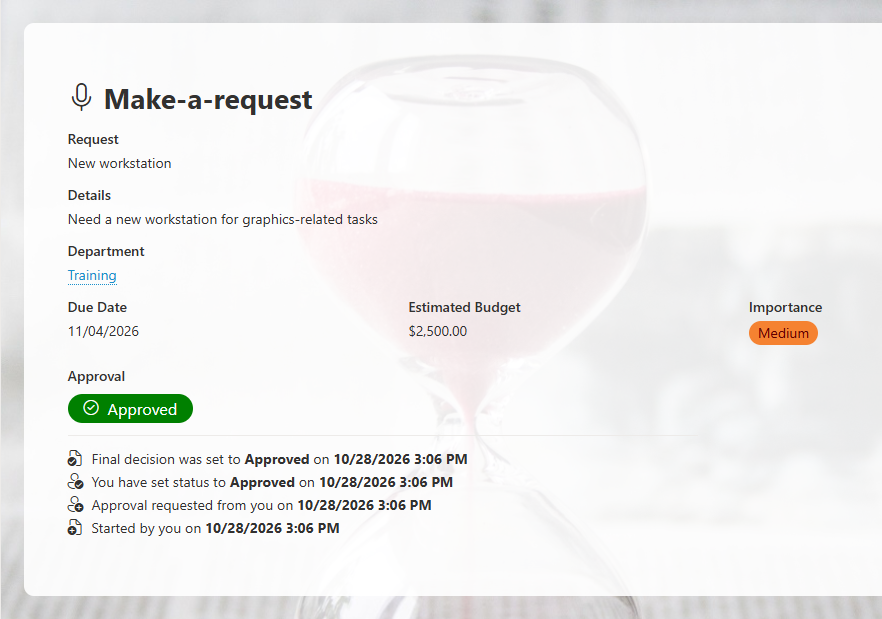
Decisions deserve better evidence than a status column that somebody set. The Approval control records every stage of every approval as a structured log on the item: who was asked, who answered, what they decided, what they commented, and when, with delegation and escalation noted when they occurred. The log is the difference between "Status says Approved" and "Dana approved stage two on March 3rd at 14:12 with this comment," and it accumulates with no effort beyond using the control, which is the recommended path for approvals anyway. For decisions made outside formal approvals, the inbox click, the command bar verdict, the next two ledgers pick up the thread.
Ledger three: what the system did, in Action History
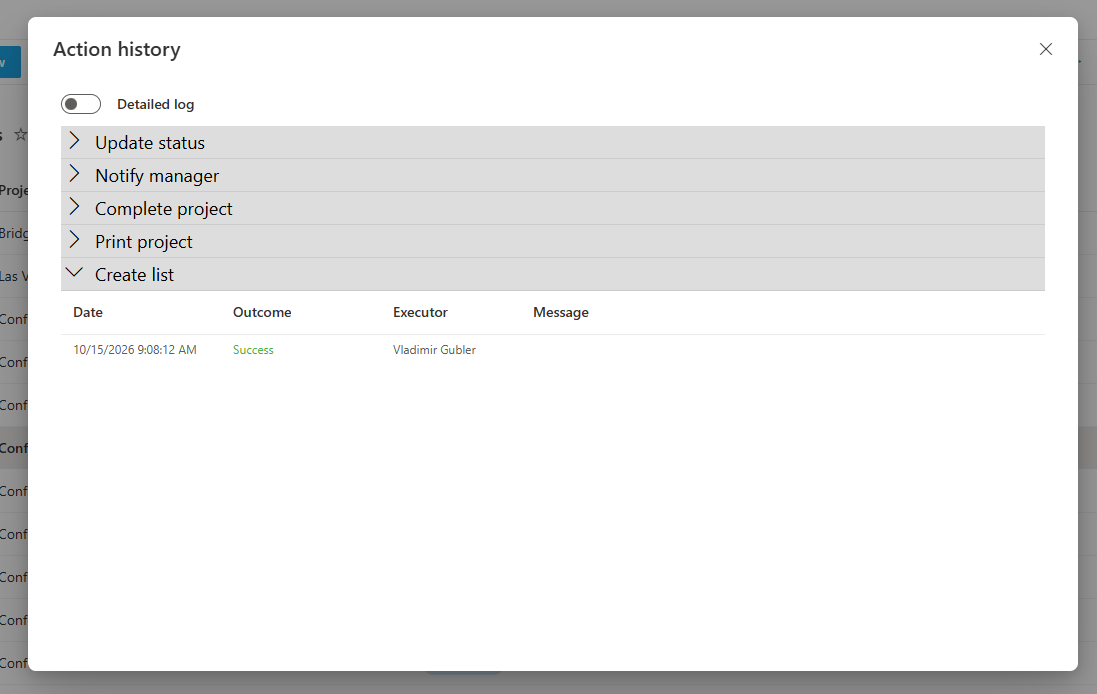
Every action execution lands in Action History with its outcome and timestamp: the update that advanced the status, the task generation, the escalation sweep that caught the overdue item, the manual action someone ran from the command bar with the parameters they supplied. Automation is often the audit's blind spot, things happened and nobody remembers arranging them, and the history closes it: for any record, the full list of what the machinery did and whether it succeeded. It also audits the audit, in a sense: the SLA escalations and reminders that were supposed to fire either appear in the history or did not happen, and both answers are findings.
Ledger four: who was told, in the delivery log
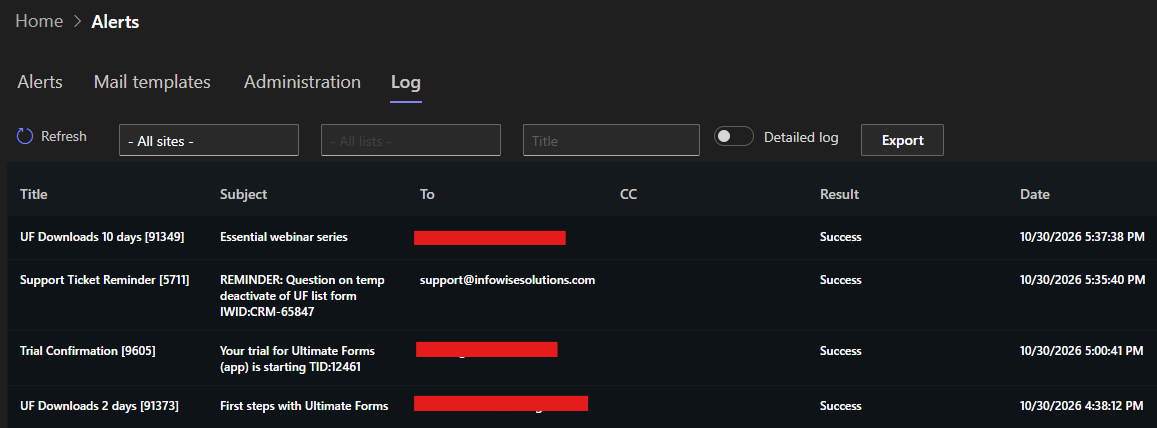
"We notified the vendor" is a claim; the alert delivery log is a record. Every notification the alert engine sends is logged with its recipients, time, and content, so the question that dissolves most disputes, did the responsible person actually receive the warning, has a lookup instead of a mailbox search. Paired with action buttons in the emails, the loop closes fully: the delivery log shows the request arrived, and Action History shows the click that answered it, which together prove both halves of an inbox decision.
Ledger five: that none of it was quietly changed
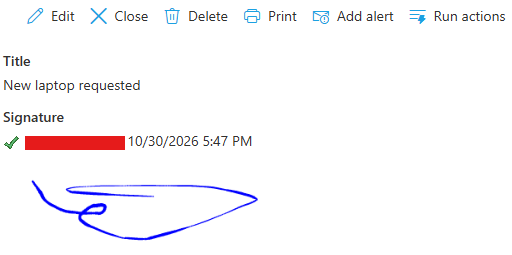
The first four ledgers record events; the fifth protects states. Permission rules lock the columns that must not drift, the stamped dates, the computed deadlines, the decided values, so the record's load-bearing facts have exactly one author: the rule that wrote them, with after-change stamps landing once, at the transition. Sequential status enforcement keeps the lifecycle honest, no skipping from Draft to Closed, no reopening without the right role, so the trail's chapters arrive in order. And where the stakes justify it, electronic signatures bind identity to data: a signature column attached to the columns it protects, validated against the directory, visibly broken if any protected value changes afterward. That last property converts the whole stack from "we log changes" to "changes to the signed facts announce themselves."
What each ledger does not prove
Reading the ledgers well also means knowing their edges, because an auditor will. Version history shows that a value changed and who saved the change, not why, the why belongs to the approval log's comments and the form's enforced sequence. The approval log proves the decision, not that the decider saw what you see now, which is what signature binding adds for the records that need it. Action History proves the automation ran, not that its configuration was correct on the day, so changes to the actions themselves are worth the same documentation discipline as any controlled procedure. And the delivery log proves sending, not reading, which no system can prove, and is why consequential notifications pair with an acknowledging click the history can record. Knowing the edges is not a weakness in the trail; it is what lets you present it without overclaiming, which auditors reward.
Composing the trail for one process
The ledgers come free; the craft is coverage. Walk the process and name its decisive moments, the submission, each decision, the notification obligations, the automated consequences, the closure, and check each against a ledger. Submissions and edits: version history, with the form validating completeness so the record is born whole. Decisions: the Approval control where formal, logged manual actions where operational. Obligations to inform: alerts, never ad hoc mail, precisely because alerts are logged. Consequences: actions, never hand work, because actions are logged. Closure: enforced sequence, stamped dates, and, where required, the signature. A process arranged this way audits itself as it runs, and the quarterly audit packet becomes a scheduled report: the filtered view of the period's records, printed to a branded PDF with the decisive columns, emailed to compliance on the first of the month.
The deeper shift is cultural, and worth naming to the team: an audit trail built this way is not surveillance, it is protection. The assignee whose stamped dates show the SLA met, the approver whose log shows the diligence done, the coordinator whose delivery log shows the warning sent, all of them are defended by the same records that expose the gaps. Evidence that accumulates automatically is evidence nobody had to remember to keep, and that, in the end, is the only kind an organization can promise.
Frequently asked questions
Add your comment