Every PDF your SharePoint generates can leave the building cryptographically signed. Upload a certificate and its password into a print template in Ultimate Forms, and each PDF exported through that template carries your organization's digital signature: the recipient's PDF reader verifies who issued the document, and any alteration after signing breaks the seal visibly. The certificate itself is stored encrypted and can never be downloaded, it is usable by the template, not retrievable from it. This guide covers what a digital signature adds to generated documents, how the capability works, and the automated pipelines, signed invoices, certificates, and merged packets producing themselves, that it completes. For the generation system underneath, see the complete document generation guide.
What a digital signature proves
A digital signature is not a picture of handwriting; it is mathematics bound to the file. When a PDF is signed with a certificate, two claims become verifiable by anyone who opens it. Authenticity: the document was produced by the holder of the certificate, your organization, and the reader's PDF viewer says so, validating the signature against the certificate's chain of trust. Integrity: the document has not changed since signing, because any edit, a figure altered, a page swapped, a clause adjusted, invalidates the signature, and the viewer flags it immediately.
Those two properties answer the questions every emitted document eventually faces. Is this invoice really from the supplier it claims? Is this certificate the one the institution issued, or a convincing edit? Did the contract the counterparty holds change after it left us? Unsigned PDFs answer with provenance stories and file comparisons; signed PDFs answer in the viewer's signature panel, instantly, for anyone, with no call to your office. In an era of effortless document forgery, the signed PDF is the version of your paperwork that defends itself.
Worth distinguishing from the start: this is a different instrument from electronic signatures on SharePoint items, where a person signs a record, approving it, acknowledging it, with their identity validated in the process. The electronic signature says a person agreed; the digital signature on the PDF says the organization issued this exact document. Mature document flows use both, and the end of this guide shows them together.
How it works: the certificate lives in the template
The configuration is one step on the print template: upload the signing certificate together with its password, and from then on, every PDF export through that template is signed as it is generated. No per-document ceremony, no signing step for users to remember or skip, the signature is a property of the output, like the layout and the branding, applied by the same machinery that renders the template.
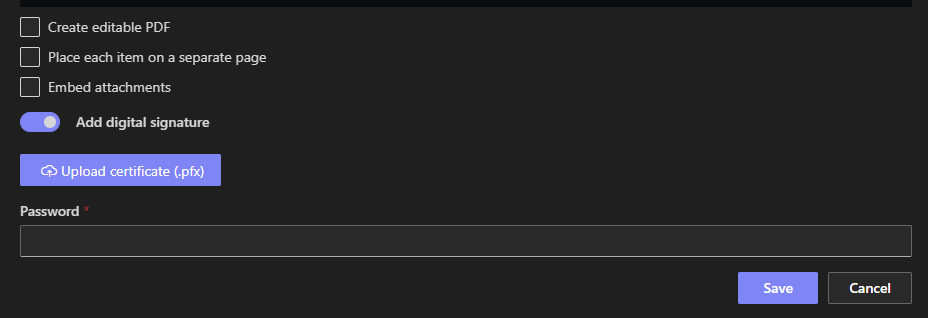
The security model deserves its own paragraph, because certificates are credentials. Once uploaded, the certificate is stored in encrypted form and is never available for download, from the template, the settings, or anywhere else. The template can use it to sign; no one can retrieve it, which is the arrangement a signing key wants: administrators configure with it, documents get signed by it, and the private material itself stays sealed inside the platform. Rotating to a new certificate is an upload, and the old one's absence from any download path means decommissioning is not a retrieval exercise either.
Operationally, this turns a traditionally awkward IT ritual, keeping a signing key secure while making it usable by a document pipeline, into template configuration, maintained by the same person who maintains the layout.
The documents that should always be signed
Invoices and financial documents. Invoice fraud runs on altered PDFs, changed bank details on a real-looking invoice above all. A digitally signed invoice gives every recipient a one-glance verification path, and gives your accounts team a clean answer to send alongside payment details: check the signature.
Certificates and credentials. Training certificates, completion records, and licenses are forged precisely because they are valuable. Signed at generation, each one carries its own proof of issuance, and the verifying party needs nothing from you but the file.
Contracts and formal correspondence. The version you issued is provable against every later copy, which quietly settles the disputes about who changed what, before they become disputes.
Compliance and audit submissions. Reports submitted to regulators and auditors benefit twice: the recipient can verify origin, and the submitting organization holds tamper-evident copies of exactly what was submitted, the document-level counterpart of the audit trail inside the system.
The pattern across all four: signing matters most where documents cross boundaries, to customers, institutions, and authorities, because that is where your systems can no longer vouch for them and the file must vouch for itself.
Signed pipelines: merge and automation
Two neighboring capabilities turn the signed PDF from a document property into a process property.
Signed packets through PDF merge. PDF merge assembles multiple documents into one file, the report with its appendices, the parent record with its children, the application with its evidence, and the merged output can itself be signed. The whole packet becomes one sealed artifact: not five documents of varying provenance stapled together, but a single file whose completeness and integrity are verifiable as a unit, which is exactly what submission packages, closing binders, and audit bundles should be.
Signed documents at scale through actions. Print actions generate documents on events and schedules, and when the template carries a certificate, everything they produce is signed, with no one in the loop. The approval that triggers the invoice emails a signed invoice. The course completion generates a signed certificate. The month-end run files thirty signed statements into the library. Signing by hand scales with headcount; signing in the template scales with the machinery, and the thousandth document is as verifiable as the first.
And the combination with electronic item signatures completes the trust story end to end: the approver's electronic signature, captured on the item and rendered in the document, says the person authorized this; the certificate's digital signature on the PDF says the organization issued exactly this file. Approval provenance inside, document integrity outside, both automatic.
Adopting it deliberately
Three decisions make the rollout clean. Choose which templates sign. Boundary-crossing documents, invoices, certificates, submissions, should; internal working printouts need not, and the per-template configuration makes the policy exactly as granular as the template library. Settle certificate stewardship. The platform secures the uploaded certificate; the organization still owns the questions around it, which certificate, issued by whom, renewed when, and a calendar entry ahead of the certificate's expiry is the one piece of upkeep the capability asks for. Tell recipients once. A line in the email template, "this document is digitally signed; your PDF reader can verify it", converts the invisible protection into visible trust, and teaches counterparties to expect the seal, which is when forgery attempts start failing at their desk instead of yours.
The through-line is the one the whole printing cluster stands on: properties that used to require effort per document, formatting, completeness, delivery, and now provenance, become properties of the template, decided once and inherited by everything it produces. The signature is simply the last of them: the generated document, finished, delivered, and now provably yours.
Frequently asked questions
Add your comment