Sales is the one business function that sits closest to revenue. And yet, in many organizations, it runs on the messiest tooling in the building. The CRM holds contacts, but quotes live in Word documents on someone's desktop. Discount approvals happen over email. The handoff from sales to delivery is a meeting and a prayer. Follow-ups depend on individual memory.
Not every gap in the sales process calls for another sales tool. Most of those gaps are process problems — capture, route, approve, generate, notify, track — and that's exactly the kind of work SharePoint with Ultimate Forms handles well. Your sales team keeps whatever CRM they use (or SharePoint becomes the lightweight CRM itself); the processes around the pipeline become structured, automated, and visible.
Here's what a complete sales operation looks like built on the platform you already own. Assembled from free, one-click templates and configured by a power user, not a development team.
Why SharePoint for sales operations?
Three reasons this works better than most teams expect.
Everyone's already there. Your sales, finance, and delivery teams live in Microsoft 365. A quote approval that happens where people already work gets acted on faster than one in a separate system with a separate login.
Process beats product for the "in-between" work. Dedicated sales tools excel at contact management and pipeline metrics. They're weak at the connective work: routing a discount to the right approver, generating a branded quote PDF, opening a delivery project when a deal closes, alerting an account manager when a support ticket comes in from a key customer. That connective work is precisely what Actions, Alerts, and Print automate.
It connects instead of replacing. With external data integration, Ultimate Forms can look up and update records in Salesforce, SQL databases, and other systems directly from SharePoint forms — so a quote form can pull live customer data from your CRM without anyone re-typing it.
The sales cycle, template by template
Every solution below is a free, fully configured template from the Solution Catalog — install with one click, then adapt to how your team sells.
1. Lead Management
The front door of the pipeline. Capture leads from web forms, events, or manual entry into a structured list with source, status, owner, and next-action tracking. Dynamic forms show the right fields per lead type, color-coded indicators flag leads going cold, and scheduled alerts nudge owners when a follow-up date slips — so no lead dies of neglect in row 214.
Install the Lead Management template
2. Sales Quote Generator
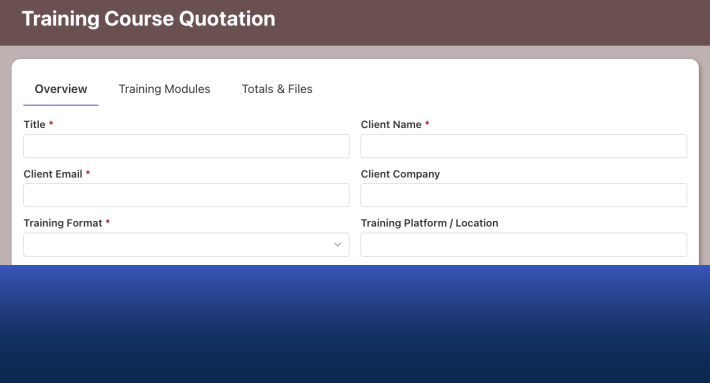
Where deals take shape — and where consistency matters most, because the quote is often the first formal document a prospect sees from you. The template organizes customer details, line items (with repeating sections for products, quantities, and pricing), and terms into a tabbed form. From there:
- Print generates a polished, branded quote as a PDF from a Word template — no copy-paste, no formatting drift between reps.
- Conditional approvers enforce your discount policy automatically: quotes within standard pricing go straight out, while discounts above your threshold route to a sales manager — and past a second threshold, to the CFO.
- Alerts email the quote to the prospect and remind the rep if it's been sitting unanswered for a week.
Install the Sales Quote Generator template
3. Order Processing
Signed quote in hand, the order form takes over: structured capture of what was sold, to whom, on what terms — with validation ensuring nothing ships with a missing PO number or an impossible delivery date. Actions can write the order into your ERP or finance database automatically, eliminating the re-keying step where errors traditionally creep in.
Install the Order Form template
4. Project Management
The handoff from sales to delivery is where customer experience is won or lost. When a deal reaches "Closed-Won," an Action creates the delivery project automatically — customer details, scope, and dates carried over, tasks generated, owners assigned. Sales sees delivery status without asking; delivery sees the full sales context without a kickoff archaeology session.
Install the Project Management template
5. Help Desk
A sale isn't an event; it's the start of a relationship that either produces renewals and referrals or doesn't. The Help Desk template gives your support and account teams structured ticket intake, assignment, SLA-style due dates with escalations, and a knowledge base — and because it lives in the same environment, an account manager can see open tickets for their customer right alongside the sales history.
Install the Help Desk template
The connective tissue: what makes it one system
Installed separately, these are five useful solutions. Connected, they're a sales operations platform:
- Dashboards everywhere. Counters and charts on a single page answer the Monday-morning questions instantly: open leads, quotes awaiting approval, quotes outstanding past 7 days, orders this month, open tickets for top accounts. Live data from the lists themselves — no exports, no BI backlog.
- Escalations built in. A quote approval stalling with a traveling manager doesn't stall the deal — escalation rules CC the right person on reminders and can let them approve on behalf.
- Documents on demand. Quotes, order confirmations, and renewal letters all generate from Word templates with one click — consistent, branded, and archived automatically with the record.
- Your data, your tenant. Customer and pricing information stays inside your SharePoint environment, governed by the security model your IT team already manages.
Start this afternoon
None of this requires a project plan. Pick the template closest to your biggest pain — for most teams it's the Quote Generator — install it in one click, and adjust the fields and rules to match how you sell. The Solution Catalog holds 450+ templates, so as your process grows, the next piece is always a click away.
Sales is close to the money, which means every day of process friction has a price. An afternoon of configuration is a small trade.
Try Ultimate Forms free or book a demo and we'll walk through your sales process together.
Add your comment