Microsoft is discontinuing Remote Event Receivers in SharePoint Online in July 2027. For most workloads the replacement is webhooks, and for most Ultimate Forms customers the transition is already behind them: our actions and alerts switched to webhooks seamlessly and transparently, with nothing to reconfigure. One capability, however, cannot ride the webhook path even in principle, synchronous event handling, and that is the part worth understanding now. This article explains the difference between asynchronous and synchronous event receivers, why webhooks replace one but not the other, which business scenarios depend on the synchronous kind, and the single check Ultimate Forms customers should make before the deadline: that modern forms exist wherever synchronous actions are used.
A short history of being notified
Remote Event Receivers (RERs) date from the SharePoint add-in era. A mechanism by which SharePoint calls an external service when something happens to an item, an add, an update, a deletion. Solutions registered their endpoints, SharePoint invoked them on events, and an entire generation of integrations was built on that callback. The add-in model they belong to has been winding down for years, a story we covered in SharePoint Add-ins Retirement: What You Must Do, and the July 2027 retirement of RERs in SharePoint Online closes the chapter: after that date, the callbacks simply stop being made, and anything still depending on them stops working.
To understand what is and is not replaceable, you need the distinction that defined RERs from the beginning.
Asynchronous vs synchronous: after the fact vs in the moment
Event receivers came in two temperaments, visible in their very names.
Asynchronous receivers, the "-ed" events (ItemAdded, ItemUpdated, ItemDeleted), fire after the operation completes. The item is already saved when the receiver runs; the receiver reacts. It can send the notification, update related records, kick off the next process step, but it cannot influence the operation that triggered it, because that operation is already history. Timing is best-effort: the work happens shortly after the event, not within it.
Synchronous receivers, the "-ing" events (ItemAdding, ItemUpdating, ItemDeleting), fire inside the operation, before it commits. The receiver participates in the save itself: it can inspect the incoming values, change them on the way in, or cancel the operation entirely and hand the user an error, and the user waits while it does. Synchronous handling is how a platform says "not so fast": the deletion that never happens, the save that is corrected mid-flight, the value that is computed at the exact moment of writing.
The distinction is not academic; it is two different promises. Asynchronous says "I will respond to what happened." Synchronous says "I get a vote in whether it happens." (For how the same distinction plays out in Ultimate Forms actions specifically, see Asynchronous vs Synchronous SharePoint Actions.)
Webhooks: the replacement that covers half
Microsoft's designated successor is webhooks: a solution subscribes to a list, and SharePoint notifies the subscriber that changes occurred, with the subscriber then querying for the details and doing its work. Webhooks are a genuinely better citizen of the modern platform, subscription-based, resilient, and independent of the retired add-in plumbing, and they are a complete replacement for everything asynchronous. Notifications, cascading updates, process automation triggered by changes: all of it maps cleanly.
But webhooks are asynchronous by design, and irreducibly so. The notification arrives after the change is committed; there is no webhook that fires inside the save, no mechanism to cancel the operation, no way to hand the user an error before their data is written, no opportunity to adjust values on the way in. Synchronous event receivers are not being migrated to webhooks; they are being retired without a server-side successor. Whatever a solution used to do in the moment of the save must now be done somewhere else, and the only "somewhere else" that exists before the data commits is the form.
What synchronous handling was actually for
It is worth being concrete about what rides on this, because the scenarios are the quiet load-bearing walls of many business solutions.
Guarding the gate. Blocking a save that violates a rule no column validation can express: a booking that double-books a room, checked against existing reservations at the instant of saving; a purchase line that would exceed the remaining budget, computed across the project at commit time. The user must be stopped before the record exists, because an after-the-fact cleanup means a window in which the invalid record was real. Preventing deletions belongs here too: the contract under legal hold, the customer record other items still reference, the "are you sure" that is actually enforced rather than suggested.
Correcting on the way in. Values computed at the moment of writing: the reference number assigned exactly once with no race, the normalized phone format, the field derived from three others that must never be out of step with them, even for the seconds an asynchronous catch-up would take.
Immediate consequence. Steps where the user's confirmation must wait on the outcome: the external system consulted during the save, with the save succeeding only if it agrees. The user sees success or failure as one truth, not a success followed by a correction email.
None of these tolerate "shortly afterward." All of them, come July 2027, need a new home.
Where Ultimate Forms stands: mostly done, one check for you
Here is the position Ultimate Forms customers are in, and it is a comfortable one.
The bulk of the transition already happened, invisibly. Actions and alerts that historically ran on Remote Event Receivers were switched to webhooks seamlessly and transparently; existing configurations kept working, and nothing required customer attention. If you never noticed, that was the point.
One feature still uses event receivers today: synchronous actions, precisely because webhooks cannot carry them.
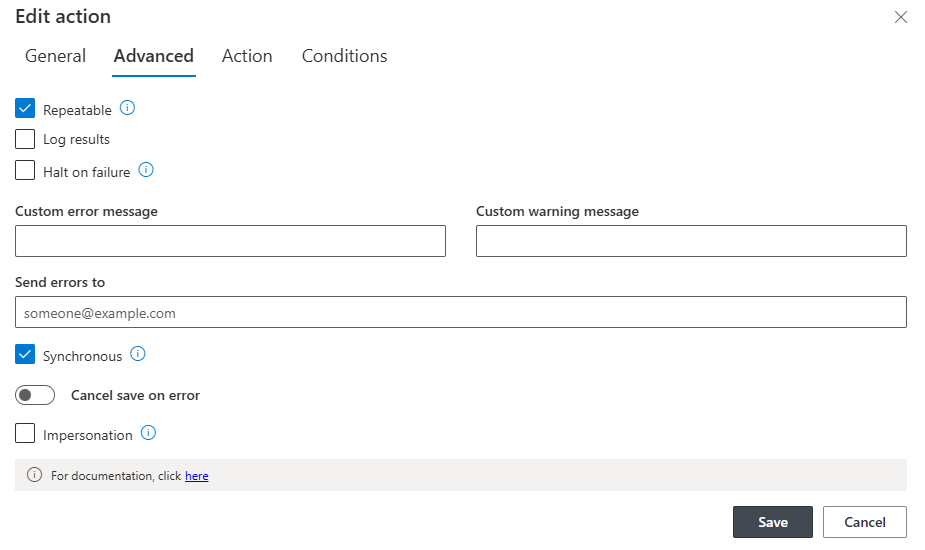
And their new home already exists: modern forms can execute synchronous actions natively, inside the form, in the moment of the save. Which is where synchronous logic belonged all along, closer to the user than a server callback ever was, with the error message delivered in the form rather than as a failed-operation surprise. When the time comes, the transition of synchronous actions from event receivers to the modern-form mechanism will be seamless to users; there is no rebuild, no reconfiguration project, no migration wizard in your future.
There is exactly one thing to ensure on your side: that modern forms are in use wherever synchronous actions are defined. A synchronous action on a list whose forms are still classic has nowhere to execute once the receivers retire, because the classic form predates the in-form mechanism. The product tells you where to look: a warning banner appears in the Actions section of Ultimate Forms whenever synchronous actions are defined on a list that has no modern form.
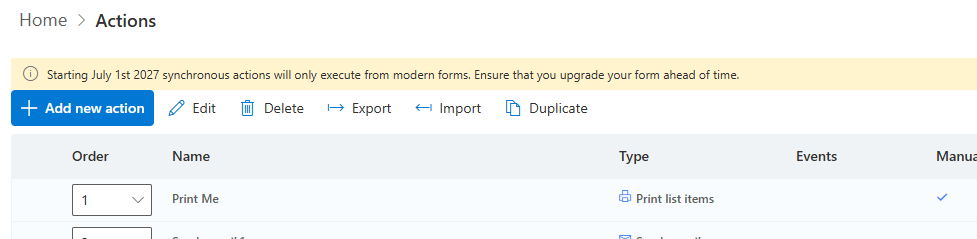
If you see the banner, that list needs a modern form; if you don't, you are already where you need to be.
The sensible to-do list
Treat this like the calm, long-runway deadline it is. Review the Actions sections of your solutions and note any warning banners; each one names a list to bring onto modern forms, and Upgrading from Classic to Modern SharePoint Forms covers that move, which is worth making for a dozen reasons beyond this one. While you are there, it is a good moment to confirm the rest of your platform posture is current too, the same housekeeping spirit as the ACS/Entra transition and the email delivery changes before it. Then carry on; the deadline that gets handled in 2026 is a non-event in 2027.
Platform retirements reward the prepared and ambush the rest. This one, for Ultimate Forms customers, asks fifteen minutes of checking for banners. Spend them.
Frequently asked questions
Add your comment