Preparing for April 2nd, 2026: What the End of SharePoint Add-ins Means for Ultimate Forms Users
We have posted about it two years ago already, but in case you missed it. Microsoft has announced an important change that affects all organizations using SharePoint add-ins. SharePoint add-ins will stop working on April 2nd, 2026. The impact is significant, especially for environments still relying on classic SharePoint experiences and legacy add-in-based solutions.
If you are using Infowise Ultimate Forms, this change is particularly relevant. Ultimate Forms has already moved away from the add-in model. But some customers are still running older versions that depend on classic SharePoint add-in infrastructure. This article explains what’s changing, who is affected, and what steps you should take to stay fully supported and avoid disruptions.
SharePoint Add-ins Stop Working on April 2nd, 2026
Microsoft has officially confirmed that SharePoint add-ins will no longer function after April 2nd, 2026. This applies to all classic add-ins, regardless of whether they are still installed, actively used, or appear to be functioning normally today.
After this date:
-
Add-in-based buttons will no longer respond
-
Add-in-hosted UI elements will fail to load
-
Classic ribbon extensions provided by add-ins will stop working
-
Any solution that depends on the add-in framework will break
This is part of Microsoft’s long-term shift toward modern SharePoint architecture and modern UI experiences.
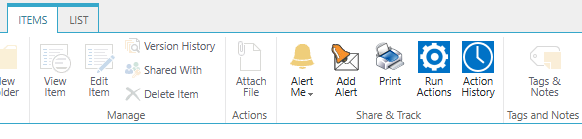
An example of classic ribbon UI
Ultimate Forms Has Already Moved Away from Add-ins
As previously announced, Ultimate Forms is no longer a SharePoint add-in starting with version 1.4.0. This change was made specifically to align with Microsoft’s direction and ensure long-term compatibility with SharePoint Online.
Key points to understand:
-
Ultimate Forms versions 1.4.0 and later do not rely on the SharePoint add-in framework
-
These versions integrate directly into modern SharePoint UI
-
No add-in infrastructure is required for core functionality
This means that customers running version 1.4.0 or later are already on the supported path.

An example of modern command bar
Modern UI Only: Where Ultimate Forms Buttons Appear
Starting with version 1.4.0, Ultimate Forms integrates exclusively with the modern SharePoint experience. As a result:
-
Ultimate Forms buttons appear in modern command bars
-
Buttons are not shown in classic list or library ribbons
-
The solution is fully aligned with Microsoft’s modern UX standards
This is an intentional design decision. Microsoft continues to invest in modern SharePoint, while classic UI is being phased out across Microsoft 365. Aligning Ultimate Forms with modern UI ensures better performance, better usability, and long-term supportability.
Customers Still Using Version 1.0.1
Some customers are still running Ultimate Forms version 1.0.1 (sometimes alongside version 1.4.0), which predates the architectural change. This version:
-
Adds buttons to classic SharePoint ribbons
-
Uses the SharePoint add-in model
-
Is still functional today in classic UI
However, it is important to be clear:
➡ These classic ribbon buttons will stop working on April 2nd, 2026, when SharePoint add-ins are retired.
Even though the buttons may continue to appear in the UI, they will no longer execute any actions once the add-in framework is disabled.
Automatic Removal of the Old Add-in Version
Ultimate Forms includes logic that attempts to remove the old add-in version automatically when detected. In many environments, this cleanup happens without any manual intervention.
However, there are scenarios where automatic removal may not succeed. This typically occurs when:
-
The original add-in has already been removed from the App Catalog
-
The add-in record exists in the site but no longer has a catalog reference
-
SharePoint permissions or tenant configuration prevent cleanup
In these cases, remnants of the old version may remain present even after installing a newer release.
Why the Installer Is the Safest Option
Using the Ultimate Forms Installer is the most reliable way to ensure your environment is fully up to date and clean.
When you use the Installer:
-
Ultimate Forms is upgraded to the latest supported version
-
Old add-in-based versions are removed
-
Configuration is aligned with the modern SharePoint UI
-
You avoid conflicts between legacy and current components
For environments that have gone through multiple upgrades or partial removals in the past, the Installer ensures a clean and predictable outcome.
Note that in the rare cases that the installer is unable to remove the old version from Site Contents, you might need to do it manually. If you can still see the button in the classic ribbons, it means that you still have an old version installed.
Why You Should Act Before the April 2nd Deadline
April 2, 2026 is already not that distant, waiting until the deadline introduces unnecessary risk.
Proactively switching to the modern UI and removing old add-in-based versions allows you to:
-
Avoid last-minute disruptions
-
Ensure uninterrupted access to Ultimate Forms functionality
-
Align your SharePoint environment with Microsoft’s roadmap
-
Give users time to adjust to modern UI patterns
-
Simplify future upgrades and support
Delaying action could result in broken buttons, confused users, and urgent remediation work closer to the deadline.
Our Recommendation
To stay fully supported and future-proof your SharePoint environment, we strongly recommend the following steps:
-
Switch to the modern SharePoint UI wherever possible
-
Upgrade Ultimate Forms to version 1.4.0 or later
-
Use the Ultimate Forms Installer to ensure a clean upgrade
-
Remove any remaining add-in-based versions, if present in site contents
-
Complete these steps well before April 2nd, 2026
Taking action now ensures a smooth transition and eliminates reliance on deprecated SharePoint technology.
Classic App Part
In the previous versions of Ultimate Forms we implemented web part technology called "app parts". We offered charts, calendars and other app parts. These will cease functioning on April 2nd 2026 as well.
For each deprecated app part there is a corresponding modern client-side web part already installed with version 1.4.0. They use the same exact configuration profiles. All you need to do is replace the app part with the client-side web part on the web part page and select the same profile in the properties. The app part needs to be removed from the page.
Classic Forms and List Views
Classic forms in Ultimate Forms rely on the classic SharePoint forms. These are not affected by the deadline and will continue to function normally. Note that Microsoft might at some point discontinue the classic user interface. No such announcement has been made public so far. If and when Microsoft discontinues the classic UI, classic forms will cease to function as well.
Please note that classic forms undergo no further development. Moreover, no changes or even bug fixes will be applied. You are encouraged to upgrade your existing classic forms. We provide an automated mechanism for upgrade.
The same applies to classic list views. Our custom column types will continue to function for as long as the classic list view pages are supported by Microsoft. You are encouraged to switch to the modern UI where possible. That helps to ensure that you future-proof your investment.
Final Thoughts
Microsoft’s decision to retire SharePoint add-ins is a significant milestone. But it doesn’t have to be disruptive. Ultimate Forms has already made the transition away from add-ins to ensure long-term compatibility, stability, and alignment with modern SharePoint.
If your environment is still using older versions tied to classic UI and add-in infrastructure, now is the right time to plan your upgrade. Moving to the modern UI and the current version of Ultimate Forms ensures your solutions remain fully functional—not just today, but well beyond April 2nd, 2026.
If you need assistance validating your current version, upgrading safely, or confirming cleanup of legacy components, the Infowise team is ready to help.
Add your comment