
Will Cooper
Will Cooper
July 28, 2026
Stay in the know
Get helpful videos

Why Building SharePoint Forms Often Means Becoming a Programmer

The Promise of Low-Code

Microsoft Power Apps is marketed as a low-code platform that enables organizations to build business applications with minimal programming. The promise is certainly attractive. Business users and SharePoint administrators should be able to build sophisticated forms using a visual interface instead of writing code. In theory, creating dynamic forms should be a matter of configuring options rather than developing software.

Unfortunately, that promise often falls apart once a SharePoint form grows beyond the simplest requirements. The moment a form needs to become dynamic, Power Apps shifts from configuration to programming. Administrators begin writing Power Fx formulas, manipulating SharePoint objects, and spreading business logic across dozens of individual control properties. Instead of focusing on the business process, they begin thinking like software developers.

Infowise Ultimate Forms was designed around a completely different philosophy. Rather than exposing a programming language, Ultimate Forms allows administrators to configure business rules through an intuitive Form Designer interface. There are no formulas to write, no programming language to learn, and no code to debug. Every feature is built around configuration instead of programming.

Business Rules Should Not Require Programming

Organizations rarely ask for complicated technical solutions. They ask for business rules. They want fields to become required under certain conditions, sections to appear only when needed, values to be populated automatically, and forms to become read-only after approval. These are everyday requirements that appear in purchasing systems, quality management applications, employee onboarding processes, help desks, and project tracking systems.

A true low-code platform should allow administrators to express these requirements directly. Instead of describing how SharePoint stores a Person field or how a form changes modes internally, administrators should simply define what they want the form to do. Ultimate Forms was built around this idea. The software handles the implementation automatically while the administrator remains focused entirely on the business requirement.

Automatically Populating the Current User

One of the most common requirements in any SharePoint form is automatically populating a Person field with the current user when a new item is created. Nearly every organization wants to record who submitted a request, reported an issue, or initiated a workflow.

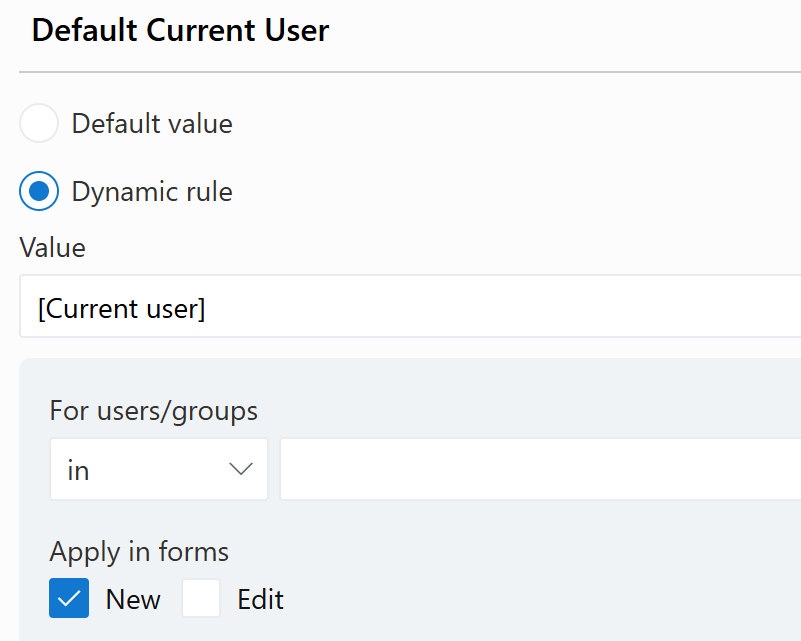
In Ultimate Forms, this requirement is accomplished by configuring a simple dynamic rule.

The administrator selects Current User as the default value and specifies that the rule applies only to new forms. The rule immediately communicates the business requirement. No formulas are written, no programming language is involved, and there is nothing to debug. The administrator simply configures the desired behavior, and Ultimate Forms handles everything else automatically.

Now compare the same requirement in Power Apps.

Instead of selecting "Current User," the administrator must write a Power Fx formula that constructs a complete SharePoint Person object. The formula references SharePoint form modes, OData metadata, claims formatting, display names, and email properties. None of these concepts are part of the original business requirement. They are implementation details that Power Apps exposes directly to the person building the form.

A Simple Business Rule Becomes 37 Lines of Code

Consider another straightforward requirement.

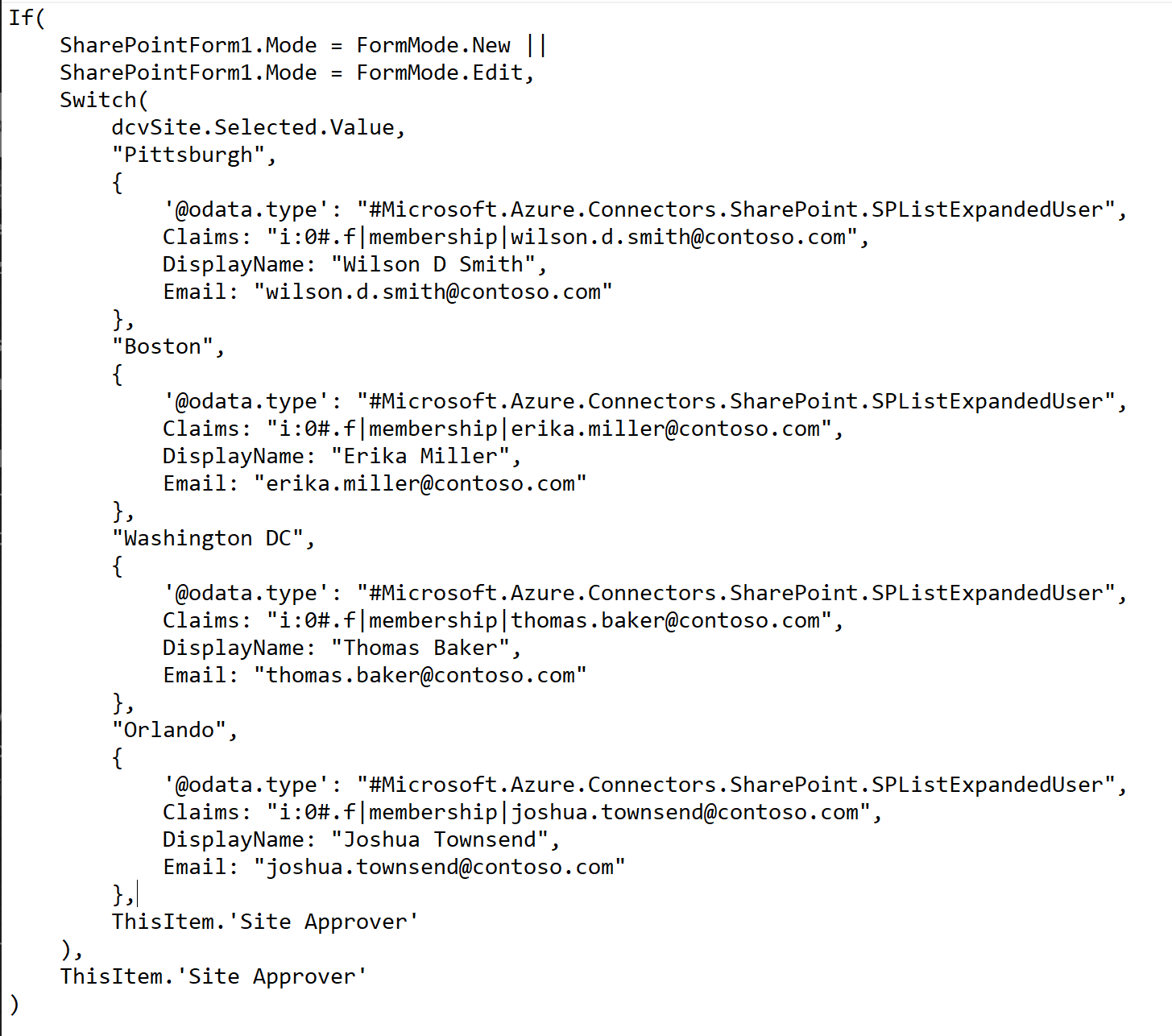
"Default the user based on four different cities."

This requirement is neither unusual nor technically complicated. It is simply a conditional default value based on another field within the form.

The Power Apps implementation tells a very different story.

Implementing this single rule requires 37 lines of Power Fx code. The developer must construct a SharePoint Person object, populate OData metadata, build claims strings, reference user properties, and write conditional logic. The business rule itself occupies only a tiny portion of the overall solution. Most of the formula exists because Power Apps requires the developer to describe exactly how SharePoint expects the data to be structured.

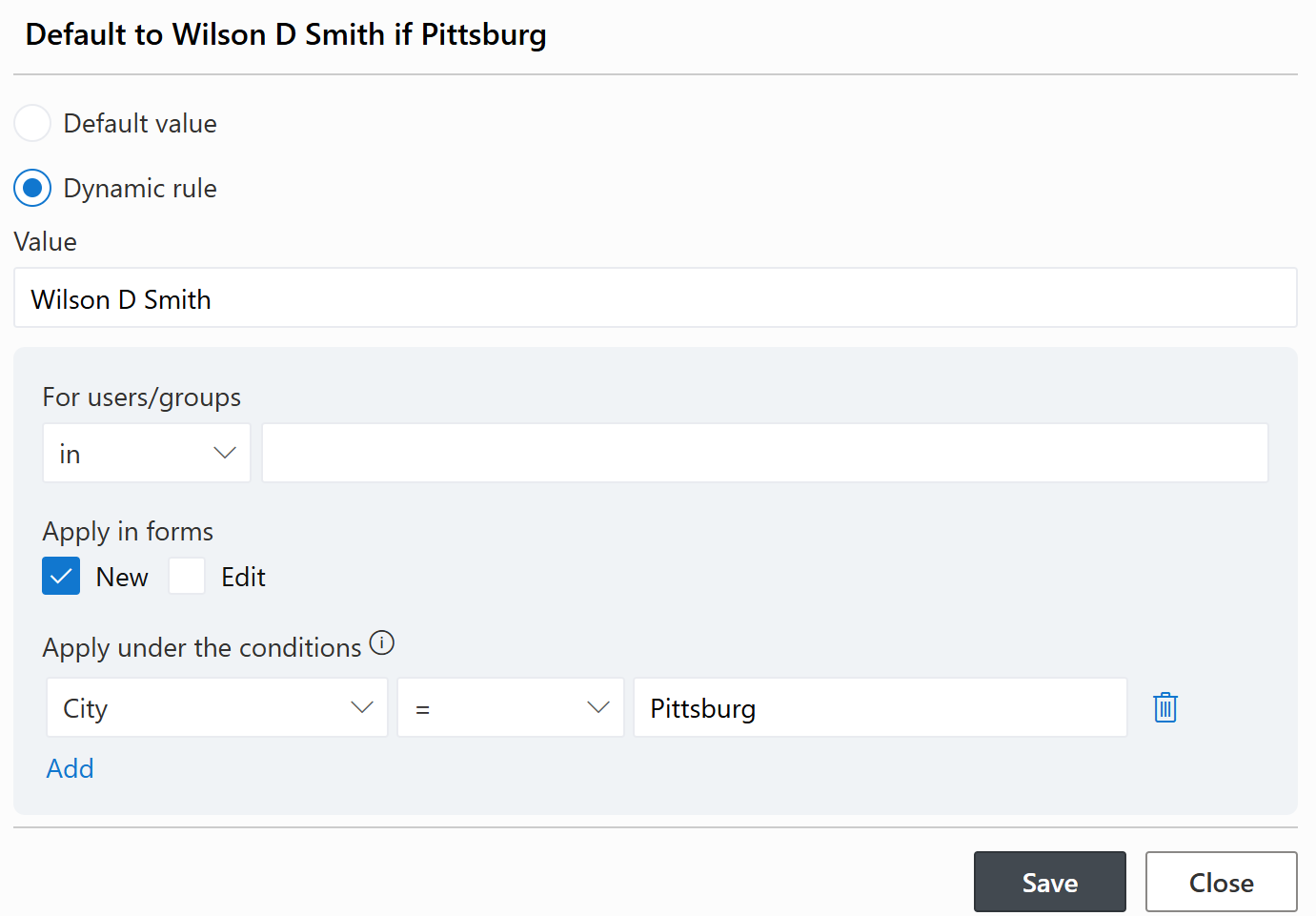
The Ultimate Forms version is dramatically simpler.

The administrator simply configures a rule that says when City equals Pittsburgh, default the Site Approver to Wilson D. Smith. The interface describes the business rule directly. There is no object construction, no Power Fx syntax, no nested functions, and no formulas of any kind. The administrator describes what should happen, and Ultimate Forms takes care of how it happens. Rinse and repeat for each city.

Making Approved Forms Read-Only

Another common requirement is preventing users from modifying records after they have been approved. Many organizations allow administrators to continue making changes while restricting everyone else to read-only access.

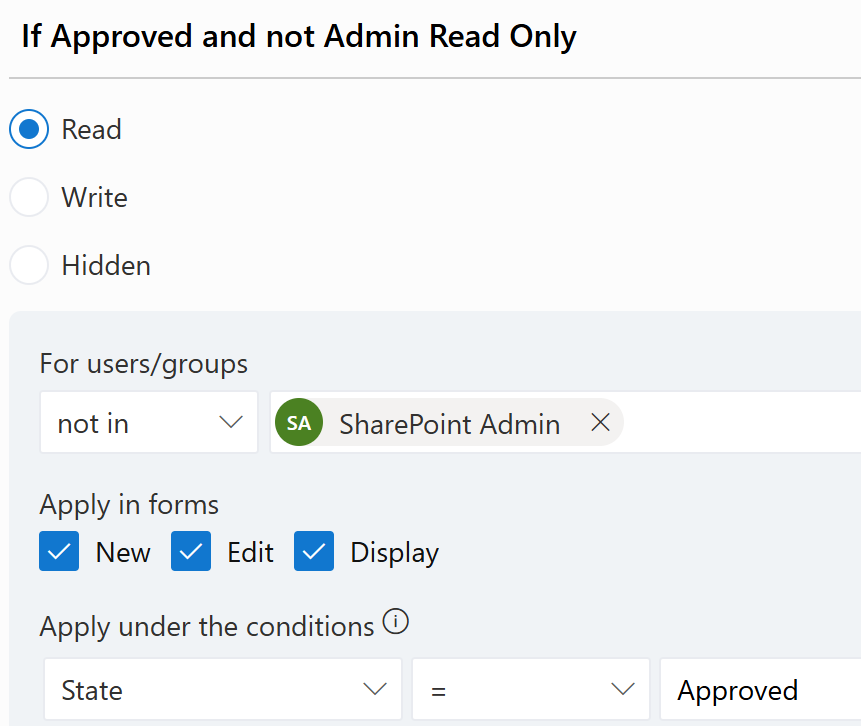
Ultimate Forms handles this requirement through another visual permissions rule.

The administrator simply specifies that users who are not members of the SharePoint Admin group should receive Read permissions whenever the State field equals Approved. The rule is easy to understand because it mirrors the business requirement exactly. Anyone reviewing the configuration can immediately understand the intent without reading a single line of code.

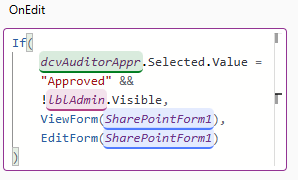
Power Apps requires a completely different approach.

Instead of configuring permissions, the developer must write another Power Fx expression that evaluates the approval status, determines whether the current user is an administrator, and programmatically switches the form between View mode and Edit mode. Once again, a straightforward business requirement becomes a programming exercise.

Every Control Is a Programming Surface

One of the biggest reasons Power Apps becomes increasingly difficult to maintain is its design philosophy. Every control exposes dozens of editable properties, including Visible, DisplayMode, Default, DefaultSelectedItems, Items, Required, Fill, BorderColor, Color, Tooltip, OnChange, OnSelect, OnVisible, and many others. While this flexibility is certainly powerful, almost every one of these properties allows or even expects Power Fx formulas.

This means that every dynamic behavior becomes another programming task. Hiding a field requires a formula. Making a field required requires a formula. Filtering a dropdown requires a formula. Defaulting a value requires a formula. Changing formatting requires a formula. Validation requires a formula. As additional requirements are added over time, formulas become scattered throughout hundreds of different properties across dozens of controls. Understanding how the application behaves often requires inspecting property after property to determine where the business logic has been implemented.

Ultimate Forms approaches the problem very differently. Business rules are not hidden inside individual control properties. They exist as organized configuration rules with clear names and clearly defined purposes. Visibility rules, validation rules, permission rules, default value rules, and formatting rules are all managed through dedicated configuration screens instead of embedded formulas. The result is a solution that is significantly easier to build, easier to understand, and easier to maintain.

Programming by Formula Is Still Programming

Some people argue that Power Apps qualifies as low-code because it replaces traditional programming languages with formulas. While the syntax may be different, the underlying activity remains the same. Programming is not defined by curly braces or semicolons. Programming is the process of expressing logic in a language that a computer executes.

Whether the language is C#, JavaScript, Visual Basic, Excel formulas, or Power Fx, the developer is still writing executable logic, debugging expressions, tracing dependencies, and maintaining application behavior. Formula-based development is still software development.

Ultimate Forms takes a different approach. Instead of replacing one programming language with another, it eliminates programming entirely for common SharePoint form customization. Administrators configure business rules rather than writing executable logic.

Low-Code Should Mean Less Programming

The goal of a low-code platform should not simply be reducing the number of lines of code. The real goal should be eliminating programming wherever possible. Business users should be able to solve business problems without understanding SharePoint internals, Power Fx syntax, claims strings, OData metadata, or object construction.

That is precisely what Ultimate Forms delivers. Every dynamic behavior is configured through business rules rather than formulas. Administrators define conditions, choose actions, and allow the software to handle the technical implementation automatically. The experience remains focused on solving business problems instead of building software.

A Better Way to Build SharePoint Forms

Power Apps is an impressive application development platform, and organizations with experienced developers can build sophisticated business solutions using it. However, many SharePoint administrators are not looking for another programming environment. They are looking for a way to build intelligent forms quickly, maintain them easily, and adapt them as business requirements evolve.

Infowise Ultimate Forms was designed specifically for those organizations. Instead of requiring formulas for every dynamic behavior, Ultimate Forms provides a comprehensive rule engine that transforms business requirements directly into working SharePoint forms. Administrators never need to learn a programming language because every feature is implemented through configuration.

That is what many people expect when they hear the phrase low-code. More importantly, it is what they actually experience when building SharePoint solutions with Infowise Ultimate Forms.

Loading...

Add your comment

Comments are not meant for support. If you experiencing an issue, please open a support request.
Administration
Ultimate Forms enables you to configure and execute a variety of improvements and extensions to your SharePoint, allowing you to build sophisticated business solutions directly in your browser. To accomplish that in SharePoint Online, we require access permissions to your SharePoint sites, to be able to work with data, configure your lists or...
Administration
I've been a dedicated SharePoint consultant for more than 12 years. During that time I have been focused on building all kinds of solutions in SharePoint. Over the years I have built thousands of SharePoint forms. Over that time, many changes have happened in the SharePoint space, but some things have not changed at all. Forms and workflow are at...
Administration
Vladi Gubler | September 02, 2025
Introduction: The Power—and Pain—of Replicable Solutions Building business applications in SharePoint often involves crafting lists, forms, logic, branding, permissions, and automation. Ideally, once you design a process—like a help desk, leave request system, or project tracker—you’d want to reuse it without reinventing the wheel. While...
Build powerful business applications in SharePoint using only your browser.
100% No-Code Solution
It’s never been easier to create, innovate, and share. All you need is your web browser!
Cost-Effective
Address business process pain points immediately. Save time and money.
Fantastic Support Team
In addition to our responsive support team, a wide variety of resources, documentations, tutorials, blogs and webinars is available to you
Popular Solution Templates
Emergency Contact Info
Critical contact details collected once, accessible when it matters most
Purchase Approval
Structured requests, clear accountability, full audit trail
Software License Management
Track software licenses, assignments, and expiration dates.
Microsoft partner logo
© 2005-2026 Infowise Solutions Ltd. All rights reserved.
Privacy | Cookie Policy | Accessibility | Cloud SLA