Healthcare runs on collaboration, and most healthcare organizations already own the platform for it. Microsoft 365 provides the structure: team sites for departments, communication sites for the whole organization, hubs to tie them together, and Teams for the conversation. SharePoint holds the documents, policies, and records. Ultimate Forms adds the layer that turns shared information into working processes: intake forms, approvals, alerts, and compliance trails. This article maps the toolkit to healthcare realities and shows where each piece earns its place.
Why collaboration is harder in healthcare
Every industry says collaboration matters. In healthcare, the stakes are unusual.
Care is multi-disciplinary by nature. A single patient journey crosses physicians, nurses, labs, pharmacy, billing, and administration. Each handoff is a chance for information to lag or go missing, and lag has clinical consequences.
The pressure around the work keeps rising. Costs climb. Regulations multiply across jurisdictions. Staffing runs on shifts, so the people who must coordinate are rarely in the building at the same time. And patients, accustomed to consumer-grade digital experiences everywhere else, now expect the same responsiveness from their providers.
Streamlining the processes behind care delivery is one of the few levers that improves everything at once: fewer errors, faster response, lower cost, and staff time returned to patients. That is why healthcare organizations keep investing in collaboration platforms, and why the platform most of them already license deserves a closer look.
The Microsoft 365 toolkit, mapped to healthcare
Microsoft 365 offers several collaboration structures. Each fits a different shape of teamwork.
Team sites serve a defined group: a ward, a department, a project. Members share document libraries, track activity, and manage their working files in one place. For healthcare teams, this is where protocols live next to the rosters and the working documents, versioned and permission-controlled. A team site also works as a departmental learning space or a small project management hub.
Communication sites speak to everyone. Where a team site is a workspace, a communication site is a broadcast: policy updates, best practices, training announcements, corporate events. For organizations that must prove policy distribution to regulators, publishing through a communication site beats an email nobody can audit.
Hub sites tie the landscape together. They connect related team and communication sites under shared navigation and consistent styling, so a clinician moving between the department site, the policy site, and the training site experiences one organized intranet rather than a scatter of islands.
Microsoft Teams carries the conversation. Chat, calls, and channels are where shift handovers get discussed and quick questions get answered. Because Teams sits on SharePoint, the documents in the conversation are the same documents in the libraries, not copies.
Microsoft 365 Groups stitch the membership together: a shared inbox, calendar, and library that follow the group across tools, so joining the team means joining everything at once.
This much, most healthcare organizations have already deployed. The gap appears one level deeper.
Where collaboration becomes process
Sharing information is not the same as running a process. A policy on a communication site informs. It does not collect signatures. A spreadsheet of on-call changes stores data. It does not notify the people affected. The platform shares; something still has to run.
That is the layer Ultimate Forms adds, without code, configured by the people who own each process.
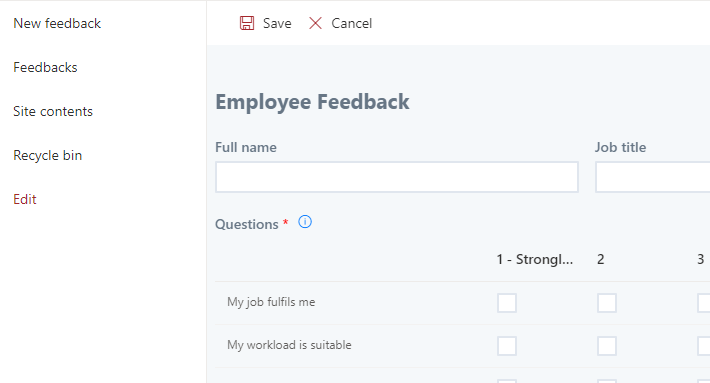
Structured intake. Requests stop arriving as prose. Patient registration becomes a guided form with validation, so records arrive complete. Equipment requests, incident reports, and referral intake follow the same pattern, each with conditional sections showing only what applies.
Approvals that move. Insurance authorizations, leave requests, and purchasing route themselves to the right approver, with reminders chasing whatever stalls and escalation when deadlines approach. The approver acts from an email or a Teams message. Nobody walks a paper form between floors.
Notifications that reach shifts. When the on-call schedule changes, alerts notify the affected staff immediately, with the details in the message. Condition-driven alerts cover the quiet failures too: the credential expiring next month, the incident report still unassigned after four hours.
Compliance you can show. Policy acknowledgments collect electronic signatures, identity-verified and tamper-evident, which matters in an industry where regulators ask who confirmed what and when. Every process leaves a record, because every process runs on list items with history.
Visibility for the people responsible. Dashboards show the state of every queue: open incidents by severity, authorizations pending, training compliance by department, live, on the pages staff already open. The broader automation picture for the sector is covered in Understanding the Role of Automation in Healthcare.
The process layer also meets staff where they already are. Forms and dashboards pin directly into Teams as tabs, so the ward channel carries its own incident form and its own queue view. The conversation and the process share one screen.
One incident, end to end
A worked example makes the layers concrete. A nurse notices a faulty infusion pump.
She opens the ward's Teams channel and taps the incident form pinned as a tab. The form asks only what applies: equipment category, location, severity, a photo from her phone. Validation will not let her submit without the asset number. Thirty seconds, done.
The submission routes itself. Severity "High" assigns the biomedical engineering team and posts to their channel, with the responsible engineer mentioned by name. The ward manager gets an alert with the details in the subject line. Nothing waits for a morning meeting.
The engineer resolves the issue and updates the record. The nurse is notified automatically. The pump's history now shows the incident, the response time, and the fix.
Meanwhile, the quality dashboard has already counted it. Incidents by category, response times by team, the trend against last quarter. When the safety committee meets, the report exists before anyone asks for it.
Count the collaboration in that story: a nurse, two teams, a manager, and a committee, coordinated without one phone call or forwarded email. That is what the platform plus the process layer buys, and the same shape serves referrals, maintenance, credentialing, and every other cross-team flow in the building.
A note on security and regulation
Healthcare data deserves a direct statement. Everything above runs inside your Microsoft 365 tenant, under the permissions, auditing, and compliance framework your organization already governs. Nothing is exported to a third-party platform. Column-level permissions keep sensitive values visible only to entitled roles, and signature trails bind confirmations to records. For the platform-level compliance picture, including what Microsoft's agreements do and do not cover, see SharePoint and HIPAA; responsibility is shared, and the configuration choices above are your side of it.
Starting without a project
The practical path is smaller than it sounds. The structures, sites, hubs, and Teams, likely exist already. The process layer starts with one process: the one generating the most chasing this month.
Templates shorten the first step. The Medical Visit Reporting System installs a working clinical documentation flow. The solution library holds hundreds more, from incident reporting to equipment tracking, each free to install and adapt. The patient appointment build shows how far a single solution can grow.
Run the first process for a month. Count the chasing emails that stopped. Then pick the second process, because in healthcare the queue of processes worth fixing is never empty, and the platform to fix them on is already paid for.
Frequently asked questions
Add your comment