A complete multi-stage approval process can be built in SharePoint in about ten minutes. And the surprising part is where the process lives: in the form itself. Ultimate Forms turns tabs into stages and permission rules into transitions, so a submission moves from department to department with each finished stage locking behind it, no workflow engine anywhere. This guide builds a three-stage software version approval, Dev submits, QA authorizes, IT approves, and the pattern transfers to any staged process you run.
The form is the workflow
Approval processes are probably the most common thing organizations build in SharePoint, and the instinct is always to reach for a workflow tool: a flowchart that routes the item, with the form as a dumb window onto it.
There is a simpler architecture for a large class of processes. Let the item's own data say what stage it is in, and let the form behave accordingly. A tab per stage. Each tab writable exactly when its stage is active, read-only once its decision is recorded. The columns themselves, QA Approval equals n/a, QA Approval equals Approved, are the state machine, and permission conditions are the transitions.
The payoff is threefold. Nothing runs outside the list, so there is nothing to break, version, or debug. Anyone reading the rules can see the entire process at a glance. And the same build works identically in SharePoint Online and on premises; Ultimate Forms keeps the interface and the steps the same in both, so the skill transfers with you.
The demonstration process has three stages: a developer submits a new software version, QA authorizes it, and IT approves its installation. Substitute your own departments freely; the shape is what matters.
The columns: one block per stage
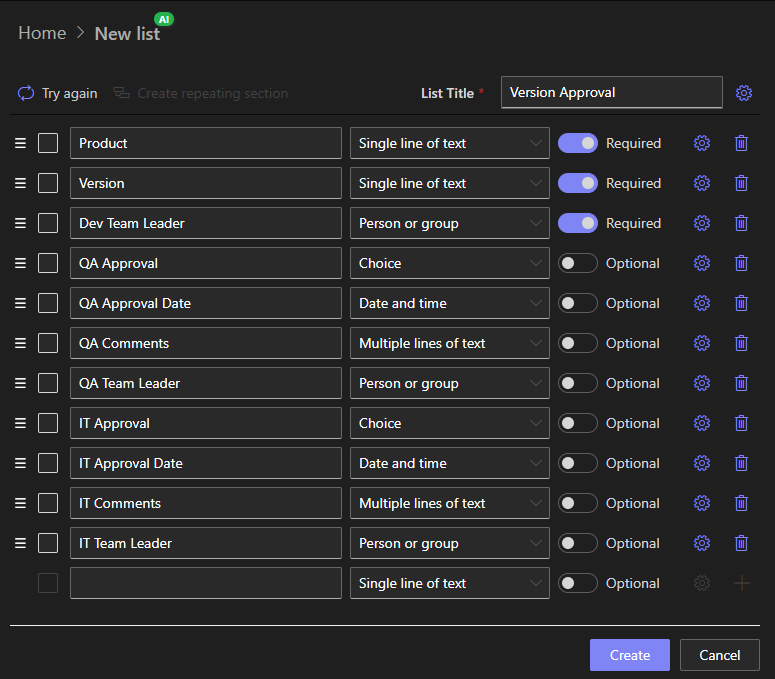
Start with a regular custom list. The Form Generator in Ultimate Forms is the fastest way to create it, and the columns fall into three natural blocks, one per stage:
The Dev block:
- Product (text, choice, or lookup): the software being approved
- Version (text): the version number
- Dev Team Leader (user)
- Dev Signature (Signature column, optional)
The QA block:
- QA Approval (choice: n/a, Approved, Rejected; default n/a)
- QA Approval Date (date)
- QA Comments (multiline text)
- QA Team Leader (user)
- QA Signature (Signature column, optional)
The IT block:
- IT Approval (choice: n/a, Approved, Rejected; default n/a)
- IT Approval Date (date)
- IT Comments (multiline text)
- IT Team Leader (user)
- IT Signature (Signature column, optional)
Two details carry the design. The approval choices default to n/a, which is what makes "this stage has not decided yet" a testable condition. And the optional Signature columns each sign their stage's values, so any later change to signed data is immediately visible, which is what turns an informal process into a formal one. Add the signature columns inside Form Designer in the next step rather than in the list settings.
The tabs: one per stage
Click Design on the list to open Form Designer. Drag the Tabs control onto the canvas and shape it into three tabs: Dev, QA, and IT. The names are yours to choose.
Assign each block to its tab: Product, Version, Dev Team Leader, and Dev Signature onto the Dev tab; the QA columns onto the QA tab; the IT columns onto the IT tab. If you are using signatures, add those columns now via New column.
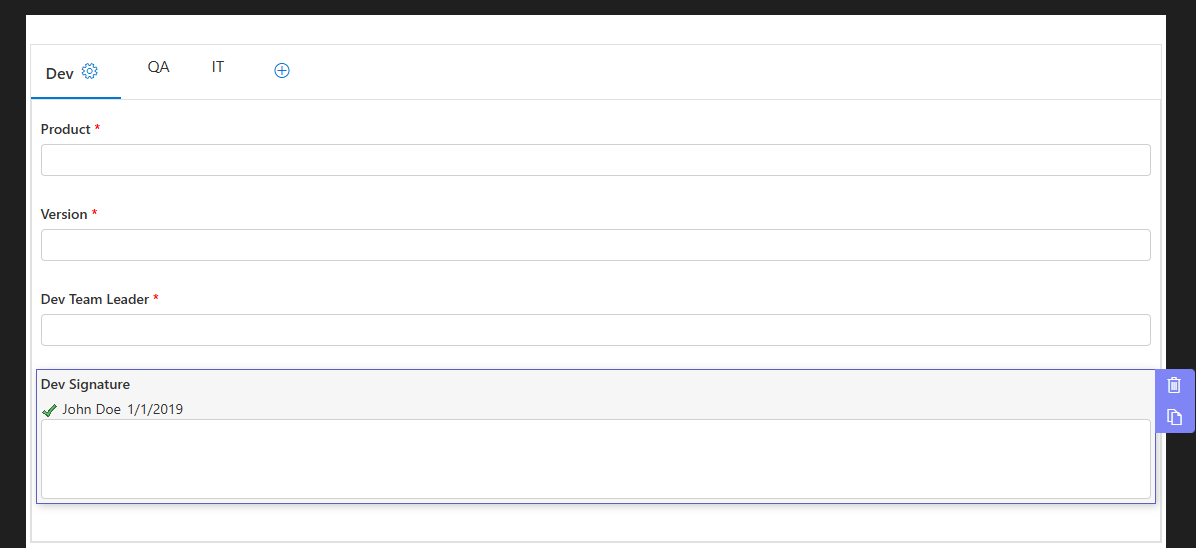
At this point the form is organized but not yet alive. The behavior comes next.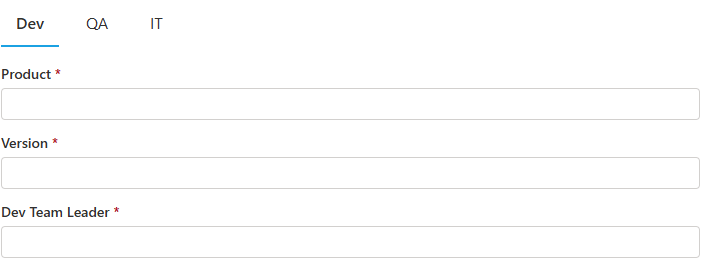
The permission rules: the process in eight lines
Select each tab and add its permission rules. This is the entire process logic:
Dev tab:
- Write on the New form
- Read on the Edit and Display forms
QA tab:
- Deny on the New form
- Write on Edit and Display, with the condition QA Approval equals n/a
- Read on Edit and Display, with the condition QA Approval does not equal n/a
IT tab:
- Deny on the New form
- Write on Edit and Display, with the conditions QA Approval equals Approved and IT Approval equals n/a
- Read on Edit and Display, with the condition IT Approval does not equal n/a
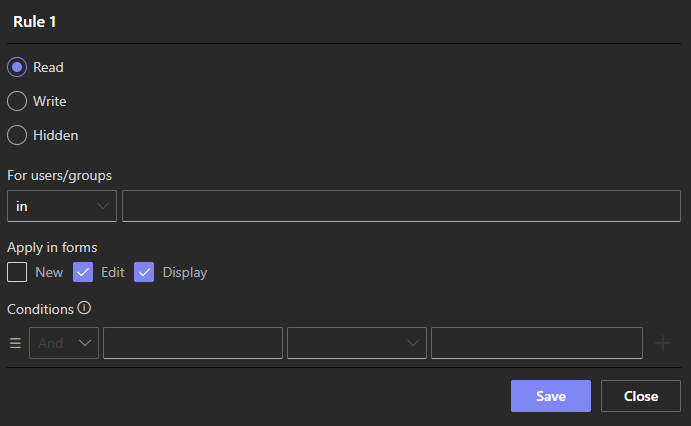
Click Publish, and read back what those rules produce. A new submission shows only the Dev tab; QA and IT do not exist yet for the submitter. When QA opens the item, the Dev tab has locked to read-only and the QA tab is editable, until the QA decision is saved, at which point QA locks too. The IT tab wakes only when QA approved, and once IT decides, every tab is read-only and the record is sealed. Four states, eight rules, no workflow.
Notice also what a Rejected decision does: the QA tab locks, the IT tab never activates, and the record stands as a complete account of a version that did not pass. The unhappy path needed no extra building.
Try it before extending it
Run the stages once as a test. Create an item as the developer: only Dev is visible. Reopen it: Dev is now read-only, QA is live. Record a QA approval, reopen, and watch IT activate. Decide as IT, and confirm the whole record is sealed.
Ten minutes of building, one minute of testing, and the process is real. The same result in a general-purpose app platform would be a genuine development task, needing specialized knowledge and considerably more time, which is the point of the exercise.
Three extensions that suggest themselves
The skeleton accepts muscle readily.
Identity, not just state. The rules above gate on stage; add conditions on who is looking. Permissions based on user identity make the QA tab writable only by the QA group, so the right stage is edited by the right people, not merely at the right time. Dynamic permissions take this as far as you need.
Notifications between stages. The one thing the form cannot do is tell QA that something awaits them. An alert triggered when an item is created emails the QA team leader; another, on QA Approval changing to Approved, notifies IT; a third tells the developer the final outcome. Three emails, and the process does its own chasing.
Dates that set themselves. Dynamic rules can stamp QA Approval Date the moment the QA decision is recorded, removing the one value users reliably forget. The dates then feed cycle-time reporting: how long versions wait in each stage is suddenly a question with an answer.
From there, the same pattern scales sideways: expense approvals, contract reviews, change requests, hiring sign-offs. Anything whose life is "one group fills its part, then the next" is three blocks of columns, a tab per block, and eight lines of rules away from running itself. Adding a fourth stage later costs one more block, one more tab, and two more rules; the existing stages do not change, which is exactly how a process definition should age.
Frequently asked questions
Add your comment