Real approval processes have conditions. The purchase that needs one signature at $1,200 needs three at $30,000; the two-day leave request needs a manager while the two-week one needs HR as well. Conditional approvers in the Ultimate Forms Approval control express this the way the business states it: a list of approvers, each optionally carrying conditions, with no flowchart anywhere. When an item enters approval, the control evaluates the conditions and builds the right sequence for that specific item automatically. This guide explains the model, walks three real configurations, and shows why the list beats the diagram for the people who actually own the process.
Approval processes are conditional by nature
On paper, most approval processes look simple. The leave request goes to the manager. The purchase goes to the team leader. Then reality arrives: the employee whose department has a different reporting structure, the absence that spans two weeks and needs HR, the purchase that crosses a threshold and suddenly needs the department manager too.
Some approvers are always required. Others matter only under specific circumstances. Capturing that without making the system unnecessarily complex, or unnecessarily rigid, is the central design challenge of approval routing, and it is one chapter of a larger story; the complete guide to SharePoint approval workflows maps all the routing patterns and where conditional approvers fit among them.
Why flowcharts make this hard
Traditional workflow tools, including flowchart-based platforms like Power Automate, handle conditional routing with branching logic. A decision node splits the flow: amounts over $10,000 go down path A, everything else down path B. Each path is its own branch with its own steps, notifications, and outcomes.
A developer can manage this. The SharePoint administrator who owns the process, and knows exactly what it needs to do, finds it exhausting, because the tool demands a translation: the business requirement must become a diagram before it can become a workflow. Branches must be drawn correctly, convergence handled, and every path tested. None of that knowledge is about the approval process; all of it is about the tool.
The deeper cost arrives later. The result is a system only its builder fully understands, and when the requirement changes, and it always changes, the diagram must be revisited, reworked, and retested. For organizations without standing development resources, that maintenance burden is what eventually kills the workflow.
A list of approvers, some with conditions
The Approval control asks a simpler question: who needs to approve this, and under what conditions?
You configure the approvers in sequence. Any approver in the list can carry conditions. When an item enters approval, the control evaluates each approver's conditions against the item: met, and the approver participates; not met, and the approver is skipped, with the process continuing to the next in line.
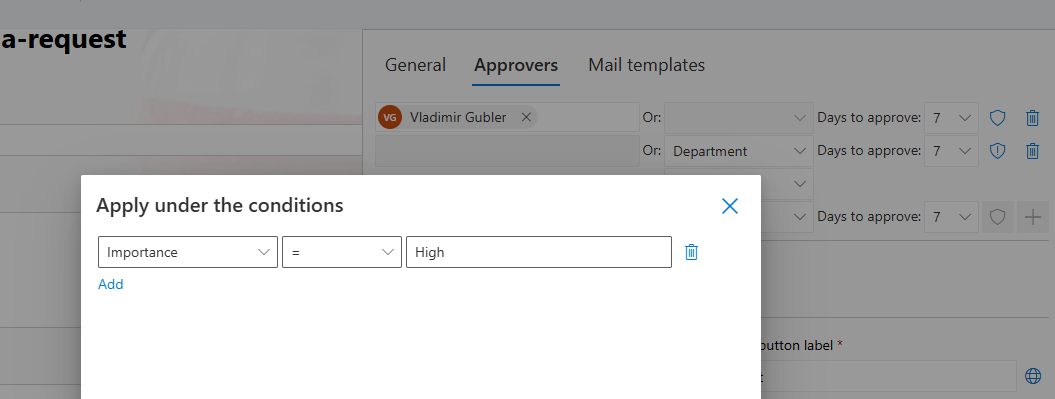
There is no branch, no alternative path to maintain, and no second flow to test. The sequence for each item assembles itself at approval time from one readable list. That is the entire model, and its simplicity is the feature: the configuration is the business rule, stated almost verbatim.
Three configurations from real processes
Purchase requests: routing by amount
Most purchases need only a team leader. Larger ones need the department manager; the largest need finance. As conditional approvers, that is one process with three entries:
- Team Leader: always required, no conditions
- Department Manager: required when the amount exceeds $5,000
- Finance Director: required when the amount exceeds $25,000
A $1,200 purchase sees one approver. A $7,500 purchase sees two, in sequence. A $30,000 purchase passes through all three:
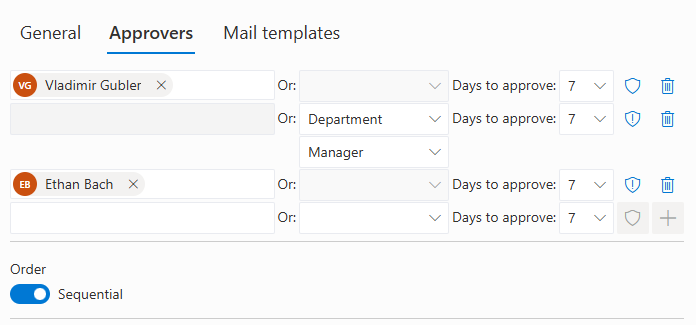
Three entries, two conditions, minutes to configure, and immediately understandable to anyone who reads it, including the auditor who asks how purchase approvals work.
Leave requests: escalation by duration
Short absences need a manager; long ones should involve HR:
- Direct Manager: always required
- HR Representative: required when the leave duration exceeds five days
The employee submits the same form either way. Two days of leave gets a quick manager approval; two weeks triggers the HR stage automatically, with the requester never needing to know the routing exists.
Contract reviews: routing by type
Legal review matters for new vendor agreements and third-party service contracts, not for routine renewals:
- Department Manager: always required
- Legal Team: required when the contract type is Vendor Agreement or Third-Party Service
One process covers every contract. No separate workflow per contract type, and no renewal waiting in a legal queue it never needed to enter.
The readability dividend
The difference between the list and the diagram matters most for the people who own the process but do not write code.
Tell a SharePoint administrator the requirement, team leader for everything, manager above $5,000, finance above $25,000, and they understand it instantly. The conditional approver configuration is that sentence, transcribed: no translation into nodes, no convergence handling, no branch testing. The conditions read in plain terms, amount greater than, duration exceeds, type is one of, so the configuration can be reviewed, verified, and modified by anyone who understands the business, not just whoever built it.
That same readability pays at maintenance time. When the manager threshold moves from $5,000 to $10,000, the change is one value in one condition. When a new approver joins the sequence, you add a line and set its conditions. The configuration after the change is as readable as before it, and the modification takes minutes in the same afternoon the requirement is identified, not a development ticket and a two-week queue.
Part of a complete approval machine
Conditional approvers are one capability of the Approval control, which already carries the rest of the machinery: the approval happens inside the form, the data locks during the cycle, approvers can resolve dynamically from the item's own columns, notifications and reminders run automatically, every decision lands in the inline log, and rejections can be formally appealed. Conditions and dynamic resolution combine naturally: the department manager approver can be both conditional on the amount and resolved from the requester's profile, so the right person is included for the right items with nothing hardcoded anywhere.
For the gentlest end-to-end introduction to the control, see fast and simple approvals; for when an included approver fails to respond, escalation rules pick up the chase.
The goal is routing power without the diagram
Most approval routing can be expressed as a list of approvers with simple conditions: always, or only when a column value meets a criterion. Expressed that way, as a list rather than a diagram, the logic is accessible to the people who own the process, maintainable by the administrators who run the system, and fast to implement from the moment the requirement appears.
That is the distinction worth keeping. The aim was never to hand administrators a more powerful diagramming tool; it was to make conditional routing available without the diagram. Conditional routing is one of the four routing patterns every approval system eventually needs; the complete guide to SharePoint approval workflows covers the other three, plus escalation, absent approvers, and audit.
The Approval control with conditional approver support is available in Infowise Ultimate Forms for all supported SharePoint deployments. For the introductory overview of the Approval control, see Fast and Simple SharePoint Approvals with Ultimate Forms. Full documentation is available at infowisesolutions.com/documentation.
Frequently asked questions
Add your comment