Forms
Actions
Alerts
Associated Items
Connected Lookup
Print
Import
Signature
External Data Lookup
Calendar
Rollups
Charts
Counters
List Search
Filters
Item IDs
Color Choice
User Property
Document Link
Voting
Stay in the know
Get helpful videos
Generate custom item and document IDs in SharePoint: your own patterns from column values and functions, applied automatically.
Ultimate Forms: Item IDs
automatically generates unique, custom-formatted identifiers for SharePoint items and documents: INV-2026-00042, HR-REQ-FIN-0117, whatever your business rules require. Build ID patterns from characters, column values, and functions, apply different patterns under different conditions, and lock the ID column so nobody edits it. Works in lists and document libraries, configured in the browser, no code.
SharePoint gives every item a number. Item IDs gives every item a name your business recognizes.
A number is not an identifier
The built-in ID column is a bare integer with no format, no meaning, and no mercy: it cannot carry the year, the department, or the record type, and it resets its usefulness the moment records move. Yet every real process runs on structured references. Finance quotes invoice numbers, auditors cite case numbers, and customers reply with ticket numbers. When SharePoint cannot produce them, teams number things by hand, and duplicates, gaps, and arguments follow.Item IDs closes the gap: the identifier your process needs, generated automatically, formatted exactly, every time.
What Item IDs can do
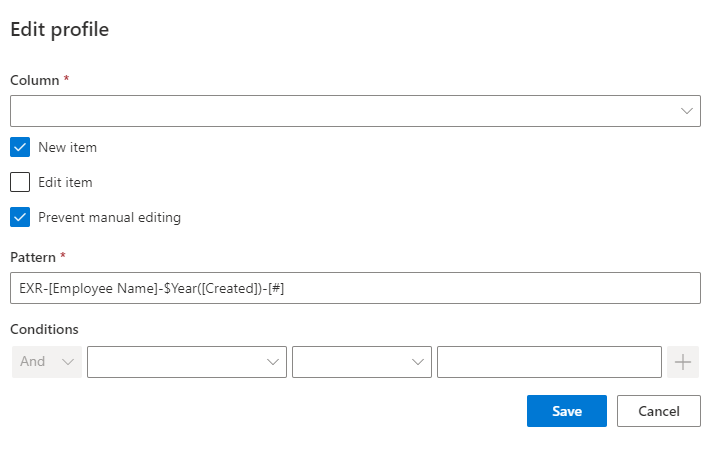
Compose IDs that carry meaning
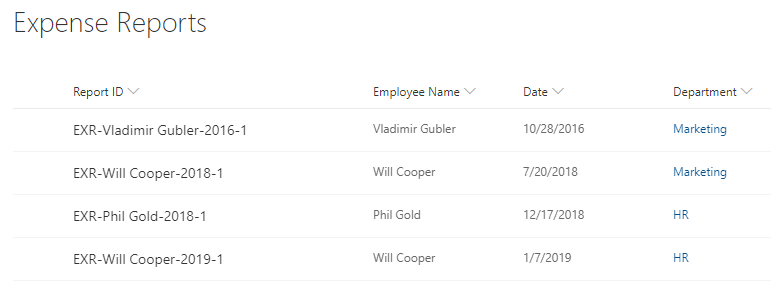
Build patterns from static characters, column values, and functions: a prefix for the record type, the year from the created date, the department code from a column, and a padded sequence number. The result reads like your business speaks, so INV-2026-00042 tells anyone what it is, when it was raised, and where it sits in the sequence, before they even open it.Different records, different rules
Assign multiple patterns to the same column, each governed by conditions on column values or user identity, and the most suitable pattern applies automatically. Contracts and amendments in one library can number themselves differently; high-priority tickets can carry a distinct prefix. One list, many numbering schemes, zero manual decisions.An ID nobody can break
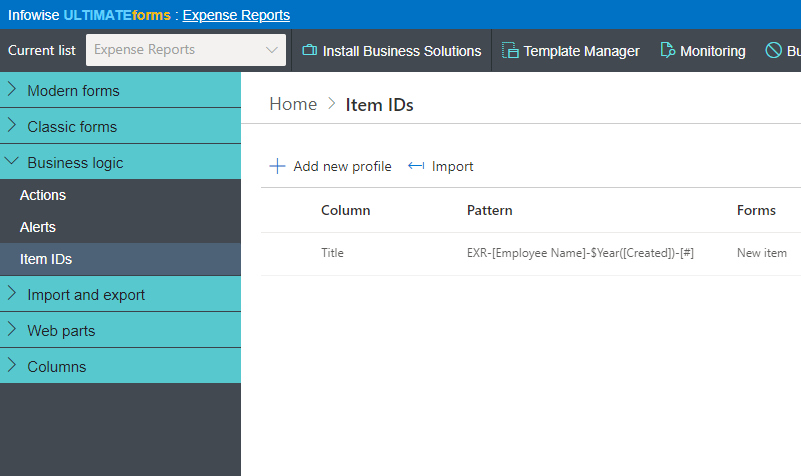
Prevent editing of the ID column, so the identifier assigned is the identifier that stays. IDs generate on item creation and, where configured, on update, and any text column can serve as the ID column, including Title, which puts the reference exactly where every view and link already shows it.Built once, deployed everywhere
ID rules are saved as part of the list template, so the numbering scheme travels with the solution: package the list, deploy it to another site or tenant-wide template, and the IDs behave identically. Reference numbers then feed everything downstream: printed on documents, quoted in alert emails, and matched by Import when a reply like "Approve item INV-2026-00042" comes back in.Compared with Native SharePoint
| Ultimate Forms | Native SharePoint | |
|---|---|---|
| Create multiple ID patterns | ✓ |
|
| Use for simple workflows | ✓ |
|
| Apply pattern according to condtions | ✓ |
|
| Include characters, column values and functions | ✓ |
|
| Apply ID to any column, including Title | ✓ |
|
| Use in both document libraries and lists | ✓ |
|
| Localized into English, French, Spanish and German | ✓ |
✓
|
Where teams use it
Ticket numbers on the Help Desk template. Invoice and quote numbers in finance processes. Contract references that encode vendor and year. Shipment IDs in Shipment Management, where consistent tracking references are the backbone of the process. Quality issues, purchase orders, case files: anywhere a record gets cited outside the list it lives in, it needs an ID worth citing.Frequently asked questions
Q: Can SharePoint auto-generate custom ID numbers?
A: Not natively in a configurable format. Item IDs adds it: automatic identifiers built from your own pattern of characters, column values, and functions, applied on creation.
Q: Can the ID include the year, department, or other column values?
A: Yes. Patterns combine static text, any column values, and functions, so IDs like INV-2026-FIN-00042 assemble themselves from the item's own data.
Q: Can different items in one list get different ID formats?
A: Yes. Multiple patterns can target the same column, each with conditions, and the best-matching pattern applies automatically.
Q: Can users change the generated ID?
A: No, if you choose so. The ID column can be locked against editing, keeping references permanent.
Q: Does it work in document libraries?
A: Yes. Item IDs works in both lists and document libraries, and any text column, including Title, can hold the ID.
Q: Do the ID rules survive when the list is templated?
A: Yes. Rules are saved as part of the list template, so deployed copies number their items identically.
Screenshots