Several features of Ultimate Forms forms load scripts from 3rd party vendors. Starting March 1st 2026, all such script sources must be specified in your SharePoint tenant configuration. Failure to do so will result in scripts being blocked and the particular features will not operate.
These are the features that require external scripts:
- Location column: Google Maps
- Payments: PayPal
- Payments: Authorize.Net
- Payments: Stripe
You only need to add script sources for the scripts you actually use:
- Google Maps: https://maps.googleapis.com
- PayPal: https://www.paypal.com
- Authorize.Net: https://js.authorize.net
- Stripe: https://js.stripe.com
To add the trusted script sources, go to your SharePoint Administration site. In the left side menu expand Advanced section, then click on Script sources. Add the relevant script sources there.
It is essential that the Infowise Solutions URL is included as a source:
https://storage.infowisesolutions.com/ufspfx/v1400/
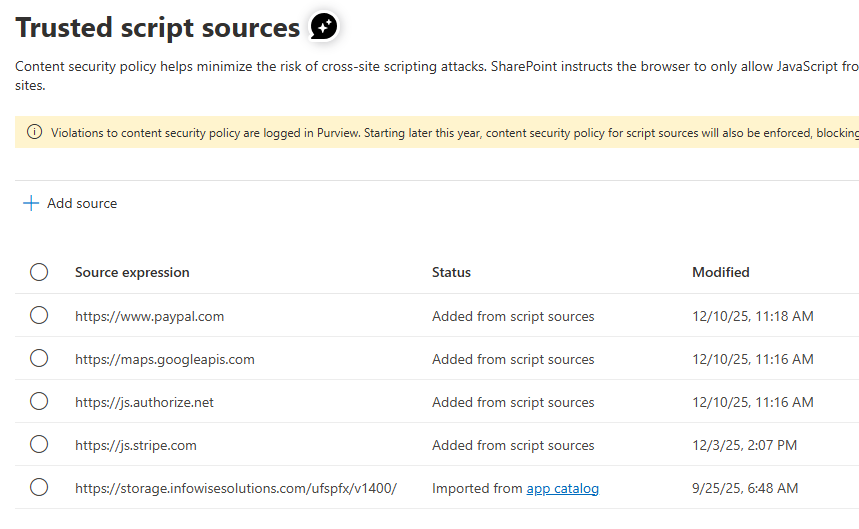
Note that the URL of the app itself https://storage.infowisesolutions.com/ufspfx/v1400/ should be already in the list. If so, do not remove or modify this URL, as it will cause the app to stop functioning in its entirety.
If you do not see this URL in your settings, add it manually. This could be due to the fact that you installed Ultimate Forms a relatively long time ago.
Step-by-step Instructions
- Open the App launcher from any SharePoint site (waffle icon in the top left corner)
- Click on Admin
- In the left menu on the Admin page click on Show All (if appears), then SharePoint
- In the left menu, expand Advanced, then click on Script sources
- Add all required scripts as mentioned above. Note that https://storage.infowisesolutions.com/ufspfx/v1400/ is always required and must be added if it doesn't already appear.
- All changes are applied immediately, there is no wait period.
Add your comment



