Usage
Alerts integrates into the SharePoint menus in the following places:
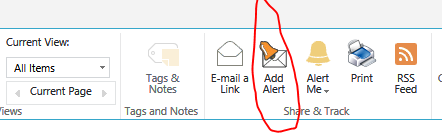
or in the modern experience

- List item context menu – enables adding alerts to that item.
- Folder context menu – enabled adding alerts for the folder and its contents.
- Item Display Form – enabled adding alerts to that item.
- List Ribbon – enabled adding alerts to items, folder or the whole list. The button under Items tab handles specific items/folders and the button under List tab handles the whole list
- Site Actions – enables managing existing alerts and adding alerts to any list. Not present in Microsoft 365 app version.
- Site Settings – enabled managing existing alerts and adding alerts to any list. Not present in Microsoft 365 app version.
NOTE: All menu buttons open the same Alert Settings page, but with different parameters. To add an alert to a specific item/folder, you must use the context menu or the display form of the particular item.
The Alerts Settings management page contains all the settings you can use to create precisely the alerts you need. The page is divided into tabs, for managing alerts, email templates, administrative settings, and viewing logs.
Get helpful videos
Last modified: 1/17/2026 7:55 PM
Loading...
Add your comment
Comments are not meant for support. If you experiencing an issue, please open a support request.
Reply to: from



© 2005-2026 Infowise Solutions Ltd. All rights reserved.