Smarter Data Retrieval Without Lookup Columns
Retrieving related data is one of the most common requirements when building SharePoint-based business solutions. Forms frequently need to pull information from other lists. These could be employee details, approval rules, configuration values, thresholds, or reference data. This information is then used to guide behavior and reduce manual input.
In traditional SharePoint design, this is often handled with lookup columns. While lookup columns work in simple cases, they introduce performance, scalability, and maintenance challenges as solutions grow. To address this, Infowise Ultimate Forms provides runtime data retrieval functions $GetValue and $Lookup. These functions allow forms to fetch related data dynamically, without embedding relationships into the list schema.
$GetValue has recently been enhanced in a very specific and important way. It now supports multiple conditions combined with AND / OR logic, including nested conditions. This significantly expands how $GetValue can be used in real-world business scenarios. Later in the article I expand upon why this is useful and what business scenarios are now easier to implement.
Why Lookup Columns Are Often Avoided in Mature SharePoint Solutions
Lookup columns are attractive early on, but they frequently become a liability in production environments.
Performance Impact
Each lookup column creates an implicit join between lists. As lists grow or as multiple lookup columns are added, SharePoint must resolve these joins at query time. This can result in:
-
Slower list views
-
Degraded form performance
-
Increased likelihood of list view threshold issues
-
Poor scalability as data volumes increase
Performance issues caused by lookup-heavy designs are among the most common SharePoint complaints.
Structural and Maintenance Challenges
Lookup columns are part of the list schema, which means:
-
They apply to all items, even when only needed in specific scenarios
-
Changing or removing them impacts existing data
-
They complicate solution templating and site replication
-
They increase coupling between lists
For long-lived or widely deployed solutions, these drawbacks add up quickly.
Runtime Data Retrieval in Ultimate Forms
Ultimate Forms approaches data relationships differently. Instead of defining them structurally in the list, relationships are resolved at runtime, inside the form, using expressions.
Two functions enable this pattern:
-
$GetValue – retrieves values from a single target item. You provide site URL (blank for current), list name, condition (which item to get) and what column to retrieve.
-
$Lookup – based on an item selected in an existing lookup columns. Returns information from additional column of the lookup item.
This keeps lists lightweight and moves logic into the solution layer, where it is easier to manage and evolve.
$GetValue: What It Has Always Done
Before discussing what changed, it’s important to clarify what $GetValue already supported.
Historically, $GetValue allowed you to:
-
Retrieve values from another list
-
Select the target item using an item ID or a single condition (e.g. Customer Name = 'XYZ')
-
Both ID and condition can reference:
-
Column values from the current item
-
Calculated expressions
-
Function results
-
This made $GetValue ideal for scenarios where one deterministic match was expected, such as configuration values or master records.
What it did not support previously was combining multiple conditions. Our customers had to resort to using calculated columns to combine multiple column values into one to be used in the condition.
What’s New: Multiple Conditions with AND / OR and Nesting
Also you could use a single condition before, what is new is the ability to:
-
Use multiple conditions
-
Combine conditions using AND and OR
-
Nest conditions to express more complex business rules
This turns $GetValue into a much more expressive rule-based retrieval mechanism while preserving its efficiency and simplicity.
Why Multiple Conditions Matter
Real business logic is rarely based on a single criterion. Decisions are often driven by combinations of attributes, thresholds, and calculated values.
With multi-condition $GetValue, you can now express logic such as:
-
Match by department AND cost center
-
Apply different rules for region A OR region B
-
Select thresholds based on calculated risk score ranges
-
Combine static values with dynamic calculations
All of this happens without introducing lookup columns or moving logic into external workflows.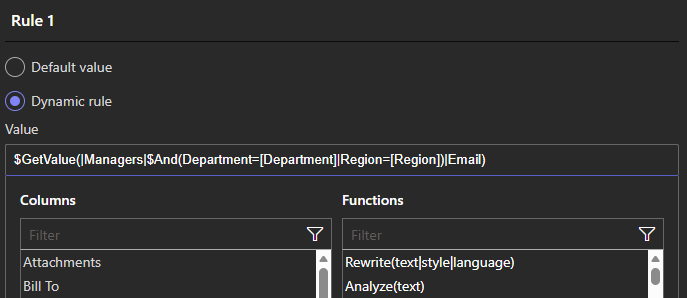
Real-World Scenarios
The most common use of $GetValue and $Lookup functions is not necessarily complex workflow logic. It is making forms easier to use by automatically pulling in related information. These functions help reduce manual data entry and ensure consistency without relying on SharePoint lookup columns.
Retrieving Customer Profile Information
A very typical scenario is a form that captures orders, requests, or cases related to a customer. The user selects a customer name or ID, and the form automatically fills in related details such as:
-
Address
-
City and country
-
Contact email
-
Account manager
Using $GetValue (or $Lookup), the form can retrieve these additional customer profile columns from a Customers list as soon as the customer is selected. The data is displayed to the user or stored with the item, without adding more lookup columns to the list.
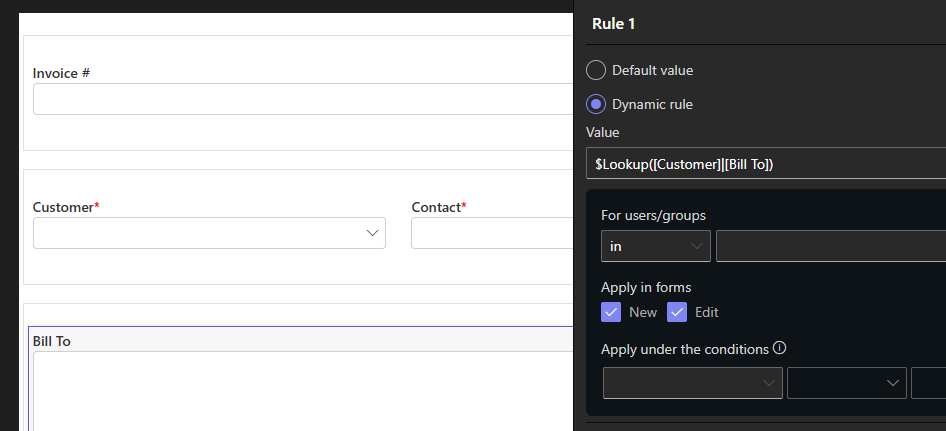
This improves accuracy and saves time, especially when users would otherwise need to retype the same information repeatedly.
Auto-Filling Vendor or Partner Details
The same approach applies to vendors or partners. When a user selects a vendor:
-
Billing address
-
Payment terms
-
Vendor category
can be retrieved automatically using $GetValue or $Lookup. This ensures that forms always use the latest vendor data and prevents outdated or incorrect entries.
Showing Related Information Without Storing It
In many cases, the form only needs to display related data, not store it. For example, when selecting a customer, the form can show the customer’s address and account status for reference. This informationd does not necessarily needs to be saved in the list item. By using $GetValue and $Lookup functions within a Fragment, you can simply display the information in forms only.
This keeps lists clean and avoids duplicating data while still giving users the context they need to complete the form correctly.
Simple Conditional Selection with Multiple Criteria
With support for multiple AND / OR conditions, $GetValue can now select the correct related item when more than one factor matters. For example:
-
Retrieve the customer record based on customer name and region
-
Select the correct pricing profile based on customer type or contract level
These conditions are simple to configure, but allow forms to handle more realistic business scenarios. And you don't need to keep adding extra lookup columns.
Replacing Complex Lookup Structures
A common SharePoint anti-pattern is adding multiple lookup columns just to support conditional behavior.
With nested conditions, a single $GetValue expression can replace:
-
Several lookup columns
-
Calculated fields layered on top
-
Conditional formatting rules
The result is a cleaner, more maintainable solution.
Why This Is Better Than Lookup Columns
$GetValue and $Lookup functions:
-
Does not affect list schema
-
Does not introduce joins
-
Does not slow down list views
-
Scales predictably as data grows
-
Simplifies templating and deployment
Logic remains where it belongs: in the form and solution layer.
Ease of Use and Maintainability
Despite the added power, multi-condition $GetValue remains:
-
Configuration-based, not code-based
-
Readable and aligned with business rules
-
Easy for business analysts to maintain
-
Simple to adjust as requirements evolve
Nested conditions allow complexity without complexity for the administrator.
Conclusion
$GetValue and $Lookup have long provided a smarter alternative to SharePoint lookup columns in Ultimate Forms. The recent enhancement to $GetValue is supporting multiple AND / OR conditions with nesting. It builds on this foundation and unlocks more realistic, enterprise-grade business logic without sacrificing performance or simplicity.
You can keep relationships out of the list schema and resolve them dynamically at runtime. This helps you build SharePoint solutions that are faster, more flexible, and easier to scale.
Add your comment