Will Cooper
Will Cooper
May 31, 2018
Stay in the know
Get helpful videos

Do you use the user facing action buttons? These buttons are great when you want your user to manually initiate actions. We've just expanded to 15 image icons so that you can easily create a nice user interface for your users.

These new button images can be found in the Advanced Settings when creating a new action.
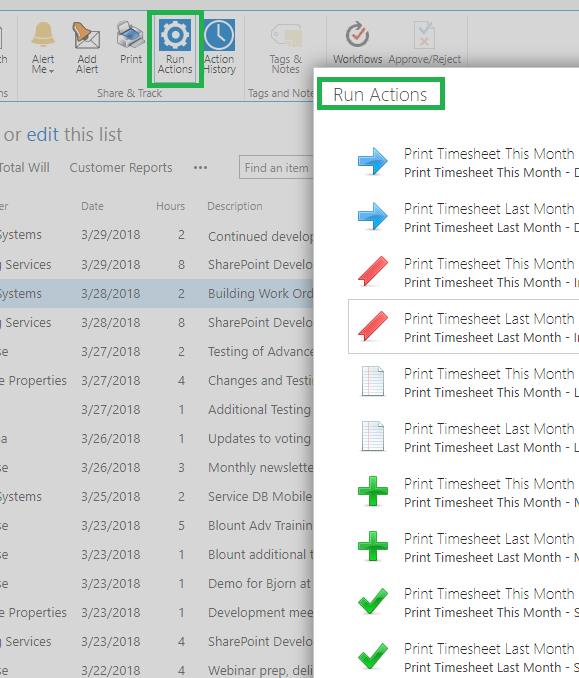
Just to remind you, you can have as many manual actions as you need. You can also specify the minimal permissions level for each button, so some could be invisible to users with insufficient permissions. Use these buttons to streamline your work. For example, a Close Project button could update multiple columns in your project item, such as set Status to Closed, set the Closing Date to Today and maybe set Percentage Completed to 100%. Very useful and prevents a lot of human error!

Loading...

Add your comment

Comments are not meant for support. If you experiencing an issue, please open a support request.
Products
Vladi Gubler | September 14, 2026
SharePoint items can carry true electronic signatures: tamper-evident, identity-verified, and bound to the data they sign. The Signature component of Ultimate Forms is a column you add to any list or library, attach to the columns whose values it should protect, and sign in one of three ways, real-time username and password validation against your...
Products
When we started to develop Ultimate Forms, we did not position it to be an InfoPath competitor or replacement. We aimed to create a platform that helps our customers use SharePoint better. We wanted to close the gap between their needs and what SharePoint can do. This way, they wouldn't have to spend money on expensive custom development. We did...
Products
Vladi Gubler | April 30, 2025
If you’ve ever used Survey lists in SharePoint, you’re likely familiar with a powerful and often underappreciated feature: the Rating Scale column. This special column type presents a matrix of statements or questions alongside a numeric scale, typically used for gathering structured feedback. The idea is simple but incredibly effective - allow...
Build powerful business applications in SharePoint using only your browser.
100% No-Code Solution
It’s never been easier to create, innovate, and share. All you need is your web browser!
Cost-Effective
Address business process pain points immediately. Save time and money.
Fantastic Support Team
In addition to our responsive support team, a wide variety of resources, documentations, tutorials, blogs and webinars is available to you
Popular Solution Templates
Help Desk
Internal company help desk with knowledge base
Marketing Content Planner
Plan, review, approve, and publish marketing content — with full visibility and no email chasing
Shipment Management
Manage shipment details, tracking information, and delivery status in one place
Microsoft partner logo
© 2005-2026 Infowise Solutions Ltd. All rights reserved.
Privacy | Cookie Policy | Accessibility | Cloud SLA