Calendars play a critical role in how organizations plan, coordinate, and execute daily operations. From meetings and events to resource bookings, deadlines, and schedules, calendars provide a shared visual timeline that helps teams stay aligned. In many organizations, however, calendar data does not live in a single place. Events may come from Exchange, internal databases, SharePoint lists, or a combination of all three.
Infowise Ultimate Forms addresses this reality by allowing its Calendar web part to surface data from Exchange and database data sources, alongside SharePoint data. This creates a unified calendar experience that brings together information from multiple systems without duplicating data or requiring complex synchronization.
Why Organizations Need Multi-Source Calendars
In modern IT environments, data is distributed by design. Different systems serve different purposes:
-
Exchange manages meetings, appointments, and shared mailboxes
-
Databases store operational or legacy scheduling data
-
SharePoint handles collaboration, lists, and business processes
When teams need a calendar view, they often want to see everything in one place, not jump between applications.
Typical challenges include:
-
Switching between Outlook, SharePoint, and internal systems
-
Duplicate calendar entries created manually
-
Inconsistent visibility across teams
-
Limited context when viewing events in isolation
A calendar that supports multiple data sources helps to solve these problems. It presents a consolidated timeline while keeping each system as the source of truth.
Calendar Web Part Explained
The calendar web part in Ultimate Forms runs only in the browser. It accesses the SharePoint and Exchange data directly, without passing through 3rd party services. This is an intentional design choice that provides several benefits:
-
Improved security, since no credentials are stored or reused
- Clear separation between visualization and data ownership
-
Faster rendering and responsiveness
The calendar becomes a visual aggregation layer, ideal for monitoring, planning, and coordination.
Using Exchange as a Calendar Data Source
Exchange is one of the most common systems organizations use for scheduling. Shared mailboxes, room calendars, and group calendars often contain valuable information that teams want to view in SharePoint.
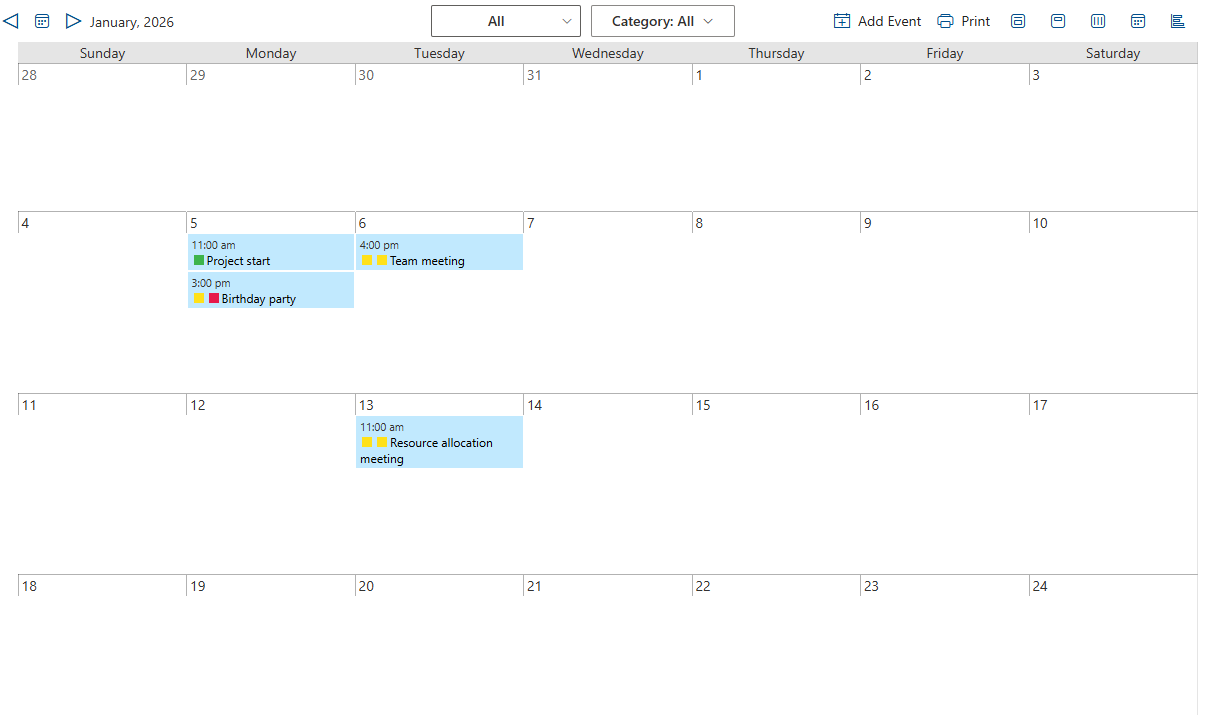
With Ultimate Forms, Exchange data can be displayed directly inside a calendar web part, allowing users to:
-
View and create meetings and appointments alongside SharePoint-based events
-
Monitor shared mailbox calendars
-
See room or resource availability
-
Reference schedules without opening Outlook
Real-World Example: Room and Resource Scheduling
Facilities teams often manage meeting rooms through Exchange. At the same time, SharePoint may track maintenance windows, renovations, or special events.
By combining:
-
Exchange room calendars
-
SharePoint maintenance lists
teams gain a single calendar view that shows both availability and operational constraints, helping avoid conflicts and miscommunication.
Using Database Data Sources for Calendar Views
Many organizations still rely on databases to store scheduling or time-based data. These may include:
-
Manufacturing schedules
-
Production timelines
-
Shift rosters
-
Training schedules
-
Legacy booking systems
Ultimate Forms allows database-backed data to be displayed in calendars without migrating or duplicating that data into SharePoint.
Real-World Example: Shift and Workforce Planning
A manufacturing company may store shift assignments in an internal database while using SharePoint for task tracking and compliance documentation.
By displaying database-driven shift data in a SharePoint calendar, supervisors can:
-
See staffing coverage at a glance
-
Identify scheduling gaps
-
Coordinate tasks with available personnel
-
Improve planning without changing existing systems
The database remains authoritative, while SharePoint provides the collaboration layer.
Combining Exchange, Database, and SharePoint Data
One of the most powerful aspects of the calendar web part is the ability to combine multiple data sources in a single view.
For example, a calendar might display:
-
Exchange meetings and appointments
-
Database-driven schedules
-
SharePoint list items such as deadlines, inspections, or milestones
Each source can be visually distinguished using colors, labels, or categories, making it easy to understand where the data originates.
Real-World Example: Project and Delivery Coordination
A project team might use:
-
Exchange for meetings
-
A database for delivery or production milestones
-
SharePoint for task deadlines and approvals
Instead of checking three systems, stakeholders see a unified timeline that supports better decision-making and coordination.
Ease of Configuration Without Development
A key advantage of Ultimate Forms is that these calendars are configured, not coded. Administrators and power users can:
-
Select the data source (Exchange, database, or SharePoint)
-
Map date fields to calendar start and end values
-
Configure labels, colors, and display options
-
Control which data appears in each calendar view
There is no need to:
-
Build custom integrations
-
Write synchronization jobs
-
Create duplicate calendar entries
-
Maintain complex scripts
This simplicity makes the solution accessible to business analysts and IT teams alike.
Security and Governance Considerations
Because the calendar is client-side and uses browser-based, user-specific authorization. This aligns well with enterprise security requirements.
Benefits include:
-
Ultimate Forms has no direct access to Exchange
-
No credential exposure in SharePoint
-
Clear audit boundaries
-
Reduced risk of unintended changes
Organizations can confidently expose calendar views to broader audiences without compromising the integrity of underlying systems.
Common Business Scenarios for Multi-Source Calendars
The ability to display Exchange and database data inside SharePoint calendars is useful across many industries and departments.
Facilities and Operations
-
Room bookings
-
Maintenance schedules
-
Vendor visits
Manufacturing and Logistics
-
Production timelines
-
Shift schedules
-
Delivery planning
IT and Infrastructure
-
Change windows
-
Maintenance events
-
Upgrade schedules
HR and Training
-
Training sessions
-
Certification renewals
-
Instructor availability
Project Management
-
Milestones
-
Deadlines
-
Stakeholder meetings
In each case, the calendar acts as a shared planning surface rather than a data entry tool.
Why This Approach Works Well in SharePoint
SharePoint excels as a collaboration and visualization platform, but it does not need to replace every system. By allowing SharePoint to display data from Exchange and databases, organizations can:
-
Preserve existing investments
-
Avoid unnecessary migrations
-
Reduce system sprawl
-
Improve visibility and coordination
Ultimate Forms fits naturally into this model by extending SharePoint’s presentation layer without disrupting backend systems.
Conclusion: A Unified Calendar Without Data Duplication
Organizations rarely operate with a single scheduling system. Exchange, databases, and SharePoint each serve important roles. Calendar web part in Infowise Ultimate Forms make it possible to bring these timelines together into a single, user-friendly view.
By supporting Exchange and database data sources, Ultimate Forms helps teams plan better, communicate more effectively, and gain visibility across systems, all while keeping configuration simple and governance intact.
Add your comment