Introduction
Modern business processes increasingly rely on multimedia content to communicate instructions, demonstrate procedures, and improve user engagement. While SharePoint forms traditionally collect text, numbers, and documents, many organizations now need a way to embed training videos, product demonstrations, onboarding instructions, compliance walkthroughs, and other visual content directly inside the forms their employees use every day.
Infowise Ultimate Forms makes this easy. Using the included Image, Video or Banner control, Modern Forms support seamless embedding of YouTube videos without custom code. Whether you are building a training request form, safety checklist, equipment inspection app, or internal onboarding workflow, embedding video provides clarity, improves accuracy, and helps users complete forms with confidence.
Why Embed Videos Inside SharePoint Forms?
Embedding multimedia inside forms is more than a cosmetic feature. It solves real business challenges.
1. Improve User Understanding
Many business processes require detailed instructions. Not everyone interprets text the same way; videos provide visual demonstrations that reduce confusion.
Examples include:
-
Safety procedures
-
Equipment operation guides
-
Step-by-step troubleshooting
-
Quality assurance checks
Video ensures users understand the process before submitting the form.
2. Reduce Training Time
Instead of scheduling separate training sessions or creating lengthy documentation, teams can embed a short instructional video directly in the form. Users learn at the moment they need the knowledge, supporting just-in-time learning.
3. Increase Form Accuracy and Completeness
When people fully understand what is expected, they provide more accurate information. Videos can:
-
Show examples of acceptable input
-
Demonstrate correct techniques
-
Explain rules or policies
This reduces errors and follow-up work.
4. Enhance Engagement
Forms are often seen as dry or repetitive. Adding multimedia breaks the monotony and keeps users attentive, especially in onboarding, training, or customer-facing scenarios.
5. Deliver Consistent Guidance Across the Organization
Every team member gets the same instruction, eliminating the inconsistencies that come from verbal explanations or outdated manuals. The embedded video becomes a single source of truth.
Embedding YouTube Videos Using Modern Form Controls
Ultimate Forms provides a specialised control that make embedding YouTube videos simple and flexible: Image, Video or Banner. Each of its 3 modes serves a slightly different purpose, allowing designers to choose the best fit for their specific form.
1. The YouTube mode: The Most Direct Way
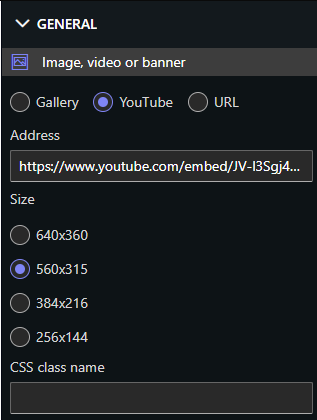
The YouTube mode is purpose-built for embedding YouTube video sources. To add a YouTube video:
-
Open your Modern Form in the Ultimate Forms designer.
-
Insert a Image, video or banner control from the toolbox.
- Switch to Youtube mode in the property on the right.
-
Paste the YouTube URL into the control settings.
-
Adjust size and permission (visibility) rules as needed.
The video appears directly inside the form, fully responsive and ready to play without leaving the page.
Business benefits:
-
Clear and immediate guidance during data entry
-
Reduces misinterpretation of instructions
-
Perfect for training, onboarding, and complex procedures
2. The Image Mode: For Clickable Thumbnails or Visual Cues
The Image mode can also be used to link users to a YouTube video. This is useful when you want to:
-
Show a custom thumbnail
-
Create a branded visual cue
-
Avoid taking up form space with a full embedded player
To use it:
-
Add an Image, video or banner control.
-
Set the image source (thumbnail or branded graphic).
-
Add a hyperlink pointing to the YouTube video or playlist.
This approach allows you to gently guide users to supplemental video content without embedding the full player.
Business uses:
-
Optional training material
-
Supplemental video instructions
-
Cleaner layout for compact forms
3. The Banner Control: Best for Highlighting Important Processes
The Banner control allows you to create visually prominent sections inside a Modern Form. Banners can include:
-
Text
-
Images
-
Links to YouTube videos
-
Buttons that open video tutorials
This is especially useful for forms used repeatedly across an organization. You can use a banner to display:
-
“Watch this before completing the form”
-
“Training video for new technicians”
-
“See the procedure demonstration”
Embedding the video link within a banner ensures users never miss critical content.
Real-World Scenarios Where Embedded Videos Add Value
Embedding YouTube videos inside SharePoint forms powered by Ultimate Forms enhances a wide range of business processes:
1. Employee Onboarding
New employees often need guidance as they complete initial paperwork or HR processes. Videos can include:
-
Welcome messages
-
Policy explanations
-
Company walkthroughs
-
Tutorials for internal systems
Embedding these directly inside the onboarding forms creates a smoother, more welcoming experience.
2. Safety and Compliance Processes
Industries such as construction, healthcare, transportation, and manufacturing often rely on visual demonstrations of correct safety procedures. Videos ensure:
-
Consistent safety guidance
-
Lower risk of injury
-
Better compliance documentation
Embedding videos within inspection checklists or hazard reporting forms reinforces proper standards.
3. Equipment and Asset Management
Technicians may need to see how to operate or inspect a machine. Videos embedded inside forms can show:
-
Start-up procedures
-
Maintenance steps
-
Troubleshooting sequences
-
Required checks
This ensures technicians follow the correct workflow every time.
4. Training and Certification Processes
Training request forms, learning assessments, and certification checklists benefit from embedded instruction videos. Examples:
-
Software tutorials
-
Compliance training
-
Product walk-throughs
-
Recorded guidance from trainers
Learners can watch and complete the form at the same time.
5. Customer-Facing Forms
Organizations offering services or technical support can embed videos explaining:
-
How to submit a request
-
How to gather required information
-
How to perform initial troubleshooting
These reduce support burden and improve customer satisfaction.
Creating Modern, Multimedia-Enhanced Forms with Ultimate Forms
Infowise Ultimate Forms turns SharePoint into a dynamic, interactive platform capable of supporting modern multimedia experiences. The ability to embed YouTube videos directly into forms through Image, video or banner control empowers organizations to:
-
Deliver better training
-
Improve compliance
-
Increase accuracy
-
Reduce support overhead
-
Provide on-demand instruction
-
Enhance user experience
With no coding required, any business unit can add videos to forms in minutes. Use it to unlock powerful new ways to communicate guidance and improve data quality.
Add your comment