Most SharePoint business processes do not need a workflow engine: smart forms with rules, statuses, and automatic actions implement the same logic with far less to build and maintain. Here is how the approach works.
Most business processes today are far more complicated than they need to be.
Not because the processes themselves are complex, but because of how they are implemented. Teams rely on a mix of emails, spreadsheets, and partially configured SharePoint lists, often supported by complicated workflows that are difficult to build, maintain, and understand. Over time, these systems become fragile, slow, and hard to change.
For many organizations, even a simple process like a request, approval, or tracking system turns into a technical project that requires IT involvement, specialized skills, and ongoing support.
But there is a better approach.
With Infowise Ultimate Forms, you can build complete business processes directly inside the form itself, without relying heavily on backend automation. By using visual tools such as tabs, permissions, and dynamic rules, the form becomes the process.
Why Traditional Workflow-Based Approaches Fall Short
When most people think about building a process in SharePoint, they immediately think about workflows.
This usually leads to:
- Complex logic diagrams
- Multiple steps and conditions
- Long development and testing cycles
- Undocumented knowledge of a single employee
The result is a system that:
- Is hard to understand
- Requires technical expertise to maintain
- Breaks easily when requirements change
- Hard to maintain when the developer leaves
For your typical business user or SharePoint administrator, this creates a barrier. Even small changes require time, effort, and often IT involvement.
That is why many teams fall back to manual workarounds such as email or Excel, even when better tools are available.
A Different Approach: The Form Is the Process
With Ultimate Forms, you can take a completely different approach.
Instead of building a process behind the scenes, you design the process directly into the form.
This means:
- The user interface drives the workflow
- The logic is visible and easy to understand
- The process evolves naturally as the form changes
The form is no longer just a way to collect data. It becomes the engine that controls how the process works.
Control the Experience with Tabs and Sections
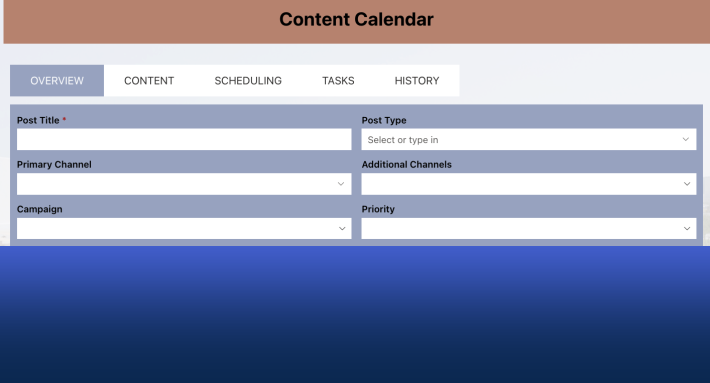
One of the most powerful ways to implement a process inside a form is by using tabs and sections.
Tabs allow you to divide the process into clear stages. For example:
- Request submission
- Manager review
- Approval
- Final processing
Instead of moving an item through a workflow, the user moves through the form.
Each tab represents a stage in the process. Users only see what is relevant to them at that moment, which keeps the experience simple and focused.
This approach makes the process intuitive. Users do not need training or documentation to understand what to do next. The form guides them naturally.
Use Permissions to Control Progression
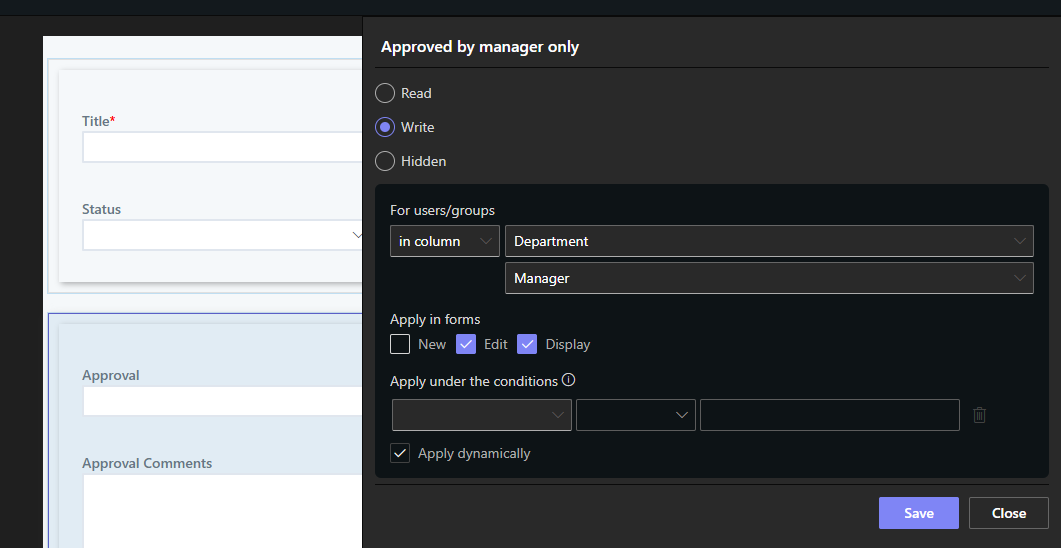
Permission rules are what turn a form into a true process engine.
With Ultimate Forms, you can:
- Show or hide sections (or even individual columns) based on conditions
- Make columns read-only after submission
- Allow editing only for specific roles or stages
For example:
- A requester fills out the initial form but cannot edit it after submission
- A manager can see and complete only the approval section
- Finance can access only the budget-related columns
This ensures that:
- Users only interact with what they need
- Data integrity is maintained
- The process flows in the correct order
There is no need for complicated workflow logic to control access. The form itself enforces the rules.
Dynamic Rules Replace Complex Logic
Dynamic rules allow you to define how the form behaves based on conditions.
You can:
- Automatically set values
- Perform calculations
- Execute functions
- Trigger validation
For example:
- Set approval status based on user input
- Calculate totals from multiple entries
- Retrieve data from another list
- Prevent submission if required conditions are not met
All of this happens in real time, directly in the form.
Instead of writing code or building workflows, you configure behavior visually. This makes it much easier to implement and maintain.
Visual Design Makes It Accessible to Everyone
One of the biggest advantages of this approach is that it is visual.
You are not writing scripts or designing complex logic diagrams. You are:
- Structuring the layout with tabs and sections
- Placing columns on a form
- Defining rules using simple conditions
This lowers the barrier to entry significantly.
Business users, administrators, and power users can all build solutions without needing developer skills. The learning curve is minimal, and results are immediate.
Reduce Dependence on IT
In many organizations, IT teams are overwhelmed with requests.
Every new process, change, or improvement competes for limited resources. This creates delays and forces business teams to wait or find workarounds.
By using form-driven processes:
- Business users can build their own solutions
- Changes can be made quickly without technical support
- IT can focus on higher-value initiatives
This shift empowers teams and removes bottlenecks across the organization.
Faster Implementation, Lower Costs
Traditional process development takes time.
You need:
- Requirements gathering
- Design
- Development
- Testing
- Deployment
With Ultimate Forms, much of this is simplified or eliminated.
You can:
- Build a working solution in hours
- Test it immediately
- Adjust it on the fly
Because everything is visual and contained within the form:
- There is less risk
- Fewer errors
- Faster iterations
This translates directly into cost savings.
Real-World Example: Approval Process
Consider a typical approval process.
Traditional approach:
- Create a workflow
- Define multiple steps and conditions
- Configure notifications
- Test extensively
Form-driven approach:
- Create tabs for submission, review, and approval
- Use permissions to control access to each stage
- Use dynamic rules to update status columns
- Display the approval section only when needed
The result:
- A fully functional approval system
- Built in a fraction of the time
- Easy to understand and maintain
Better User Experience Drives Adoption
One of the most overlooked aspects of business solutions is user experience.
If a system is difficult to use:
- Users avoid it
- Data quality suffers
- Processes break down
By embedding the process into the form:
- The experience is clear and guided
- Users know exactly what to do
- Errors are reduced
This leads to higher adoption and better outcomes.
Keep Everything Inside SharePoint
Another key advantage is that everything stays within SharePoint.
There is no need to:
- Move data to external systems
- Manage additional platforms
- Deal with integration complexity
Your data remains:
- Secure
- Centralized
- Easy to manage
This simplifies governance and reduces risk.
Build Once, Improve Continuously
Because the process is defined in the form, making changes is simple.
You can:
- Adjust rules
- Add new columns
- Modify permissions
- Introduce new stages
There is no need to rebuild workflows or redesign systems.
This flexibility allows your solutions to evolve with your business.
Conclusion: A Smarter Way to Build Processes
Building business processes does not have to be complex.
By shifting from workflow-driven design to form-driven design, you can:
- Simplify implementation
- Reduce technical barriers
- Improve user experience
- Deliver solutions faster
With Ultimate Forms, the form becomes more than just a data entry tool. It becomes a complete, visual, and flexible way to manage your processes directly inside SharePoint.
And for organizations looking to move faster without increasing complexity, that makes all the difference.
Add your comment