SharePoint items can carry true electronic signatures: tamper-evident, identity-verified, and bound to the data they sign. The Signature component of Ultimate Forms is a column you add to any list or library, attach to the columns whose values it should protect, and sign in one of three ways, real-time username and password validation against your authentication provider, a handwritten signature drawn with a stylus, finger, or mouse, or a declarative checkbox. On signing, the system stores a hashed value of the signed fields together with the signer's identity, the item version, and the time, and from then on any change to a signed value breaks the signature visibly, no matter how the change was made. That combination is what regulated environments, including those working under FDA 21 CFR Part 11, actually need from a signature, and this article explains how it works and where each mode fits. (Signatures are the formality layer of a larger approval story; our complete guide to SharePoint approval workflows covers the routing and escalation around them.)
The single sign-on paradox
SharePoint's everyday convenience is the root of the compliance problem. Coupled with single sign-on, entering data is effortless: the platform recognizes you from your on-premises domain or Entra ID login, and you never authenticate again all day. For collaboration, that is exactly right.
For regulated records, it is exactly wrong. Regulations built around electronic signatures expect the act of signing to be a deliberate, verified event: the signer proves who they are at the moment of signing, not eight hours earlier at the Windows login screen. The naive fix, disabling integrated authentication so users enter passwords constantly, punishes every interaction to secure a few; nobody wants to re-enter credentials just to look up a colleague's phone number in people search. And the naive fix collapses entirely on the production floor, where multiple employees share a single PC: expecting workers to log off and log on again every time they update a batch status is a procedure that will be circumvented by Tuesday, and a circumvented control is worse than none, because the audit trail then attributes everyone's actions to whoever logged in first.
The answer is to separate signing from session: leave everyday SharePoint as convenient as ever, and demand verified identity only at the signature moment. That is precisely what the Signature column does.
How the signature column works
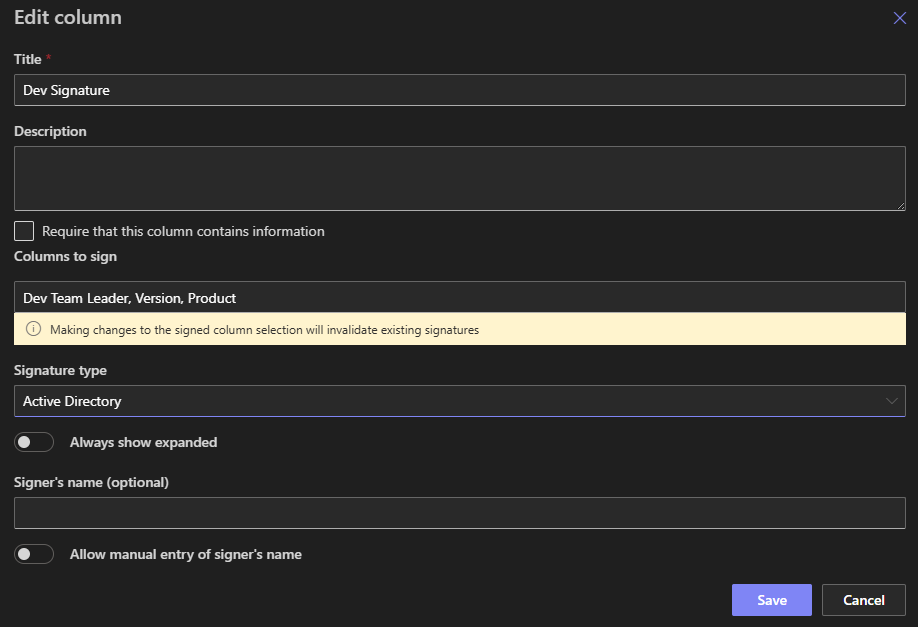
Like any other column, it is added to any SharePoint list or document library. In its settings, you attach it to some or all of the other columns in the list, and those become the signed columns: the set of values the signature vouches for. Choosing this set is the key design decision, sign the fields that constitute the record (the batch status, the test result, the approval decision), and leave the incidental ones out, so routine edits to a comments field don't disturb a signature that never claimed to cover it.
Three ways to sign
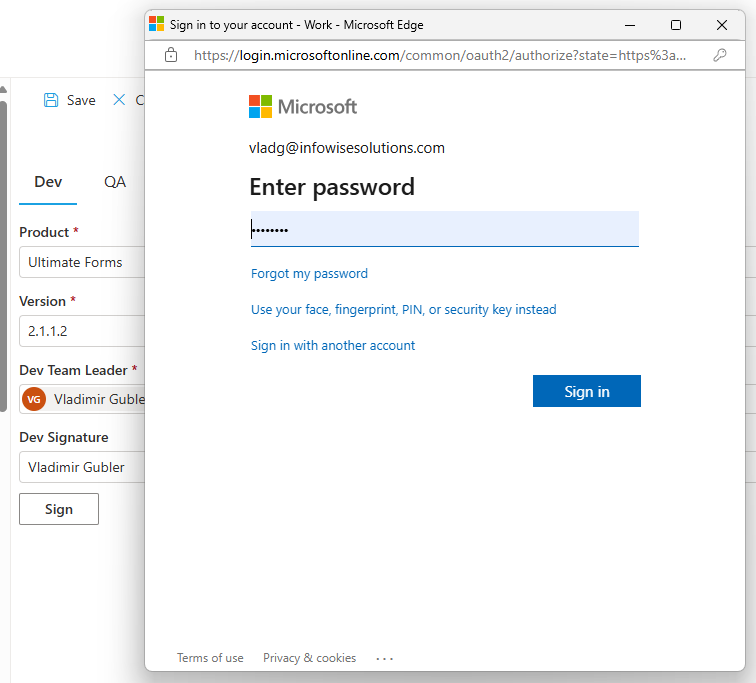
- Username and password. The column interacts with your authentication provider, Active Directory or Microsoft Entra ID, to validate the signer's identity in real time. This is the regulated-industry mode: whoever is at the keyboard proves who they are right now, which is what makes the shared-PC scenario workable, five operators, one workstation, each signature verifiably their own.
- Handwritten signature. Drawn with a stylus, finger, or mouse, the mode for the human-facing moments: customer sign-off on a delivery, patient consent on a tablet, visitor agreements at reception, anywhere the expected gesture is a signature rather than a password.
- Declarative. A checkbox confirming the act of signing, the lightweight mode for internal acknowledgments where ceremony would be friction: policy read-and-understood confirmations, checklist sign-offs, routine attestations.
What gets recorded
Signing stores a hashed value of the signed fields, the signer's identity, the item version, and the time of signing, on the item itself. The hash is the tamper-evidence: it is a fingerprint of the signed values as they stood at signing, so the signature doesn't merely say "I approved something around then," it says "I approved exactly these values, in this version, at this moment." The signature is visible in views and in the display and edit forms, and can be validated in real time:

Why it cannot be quietly bypassed
A signature is only as strong as the system's ability to notice change, and this is where the component earns its compliance role. If any signed field is changed, by the signer or anyone else, the column detects it and the signature becomes invalid until a fresh signature is applied. Crucially, the monitoring runs in the background and catches all updates, including those made outside the SharePoint UI, through web services and the integrated systems that write into your lists. An ERP integration updating a signed value breaks the signature exactly as an on-screen edit would.
That closes the loophole that undermines home-grown "signature" fields, a text column with a name in it survives any edit to the record it supposedly vouches for. Here, the invalidation is automatic, visible, and impossible to override or fake: either the record still matches what was signed, or everyone can see that it doesn't. Combined with SharePoint's own version history, the result reads like a regulator's checklist: verified identity at signing, signature bound to record content, meaning carried by the workflow context, and a full trail of what changed and when.
Putting signatures to work
The component slots into larger processes naturally. Pair it with approvals so that sign-off requires a verified signature rather than a button press, the difference between "someone clicked Approve" and "this person proved their identity and signed these values." Combine the modes on one item where the process demands it: a technician's password-verified signature on the test data, then a supervisor's counter-signature on release. Carry signatures into documents: printed and PDF output can include the signature, producing the signed paper record some processes still require, as covered in Add Signatures and Print SharePoint Forms with Ease. For a signature backed directly by a fresh Entra ID authentication flow, see Entra ID-Backed Electronic Signatures, and when a process needs an external counterparty's legally managed signature, the DocuSign integration covers that ground. The comprehensive treatment of the whole topic lives in Electronic Signatures in SharePoint with Ultimate Forms.
The scenarios write themselves once the mechanism is clear: batch records and quality checks in manufacturing, training acknowledgments in HR, consent capture in healthcare settings, equipment inspections, controlled-document approvals, consent and waiver forms for visitors and customers. Everything is configured as a column, without code, and a 30-day fully functioning trial is available for both SharePoint Online (Microsoft 365) and on-premises.
Frequently asked questions
Add your comment